Best SD Card for Your Camera: Straight Talk on V30, V60, and V90

Which SD card you actually need — with correct bitrate math, a decision tree, and an honest default: 128GB V30 for most photographers. Dual-slot, fake cards, and when CFexpress finally makes sense.

Best SD card for camera 2026 — memory card buying guide
Martin Kleinheinz
Author
Martin Kleinheinz
Photographer · Content Creator · Hannover
Updated
July 19, 2026

You invest in a camera and a lens — and then cheap out on the memory card? That's one of the most expensive mistakes in the whole setup. Too slow means the buffer fills up mid-bridal-entrance. Too small means "card full" hits exactly when you can't swap. Miscalculated means you're paying for V90 when your bitrate has been comfortably inside V30 territory the whole time.

I work events and business shoots. What counts there isn't the marketing number on the packaging — it's whether the card writes consistently, whether dual-slot saves you, and whether you still have your data by the end of the day. Here's the straight version: a default recommendation, correct bitrate math, and four concrete SanDisk Extreme PRO cards.

00
Short

The Best SD Card for Most Photographers

If you only want one recommendation: get the SanDisk Extreme PRO 128GB V30 (UHS-I). For everyday RAW, events, and normal 4K, that's enough for most cameras. Not sure? Stay right here. V60 and V90 are deliberate upgrades — not a "just to be safe" requirement.

Top 4

Sweet Spot · Budget · Fast · Pro Video

**#1 128GB V30** as the default. **#2 64GB V30**, when budget is tight. **#3 128GB V60** for fast bursts and S&Q. **#4 128GB V90** only for All-Intra / high bitrate per the manual.

Vergleich
SanDisk
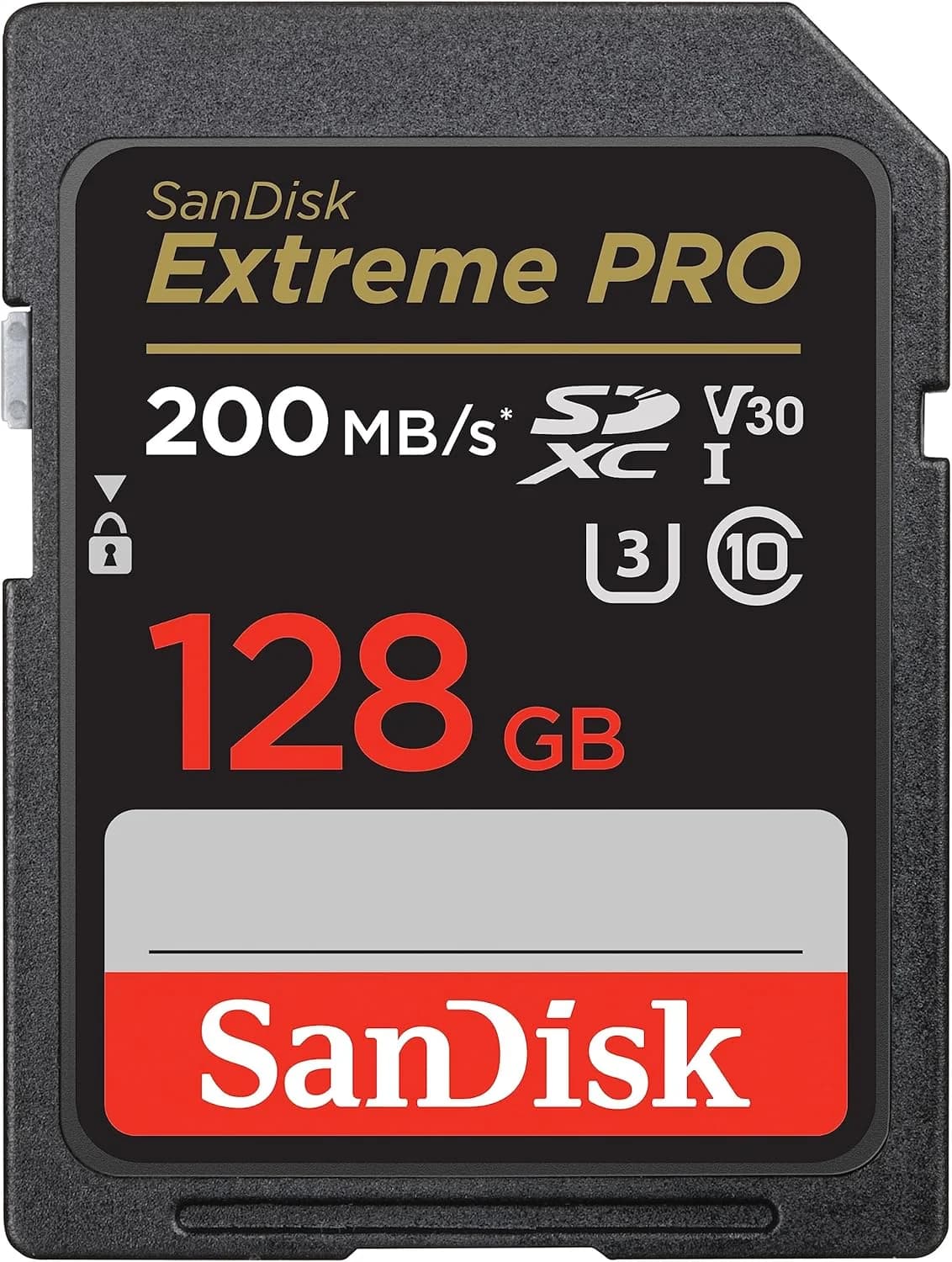
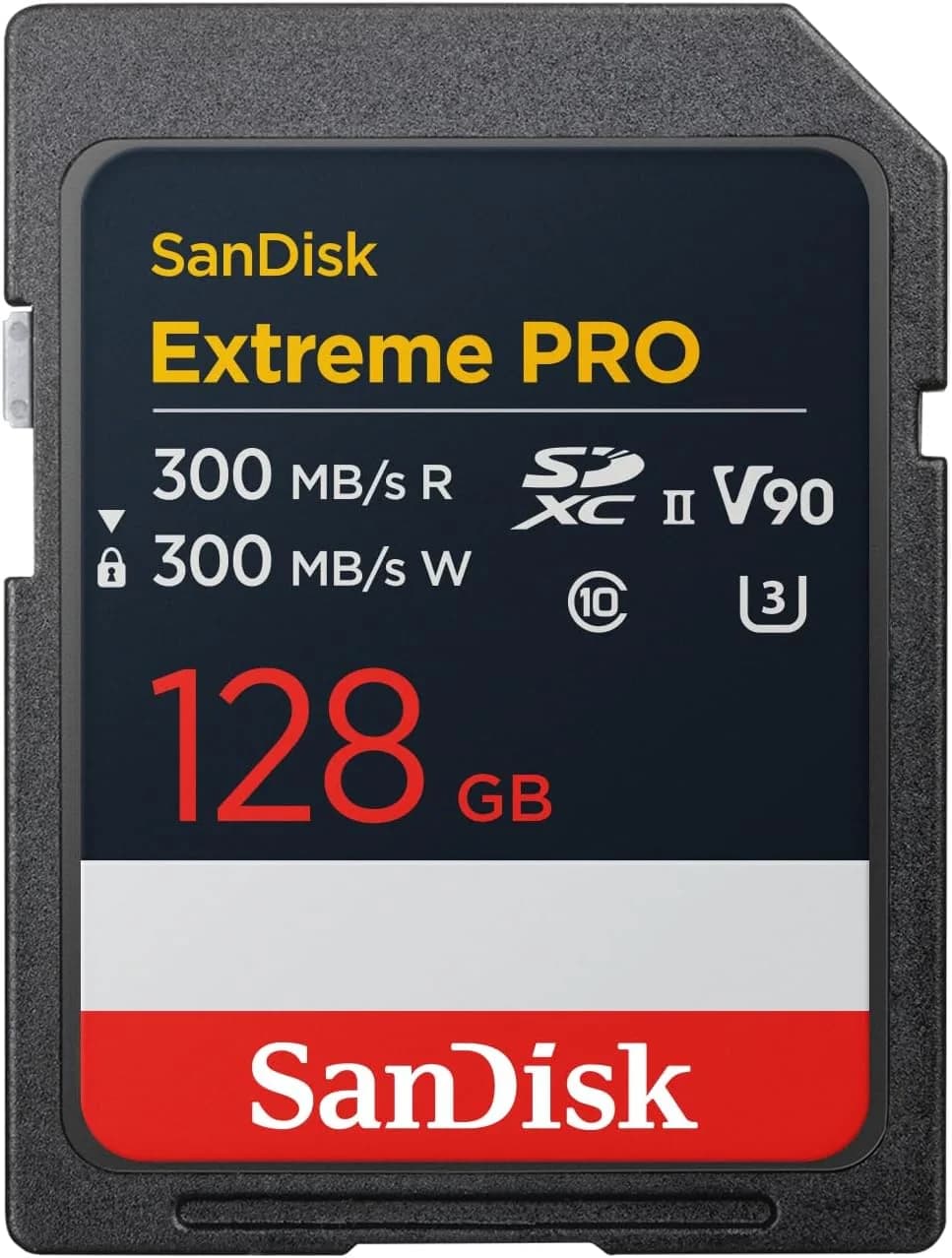
SanDisk Extreme PRO 128GB V30
SanDisk
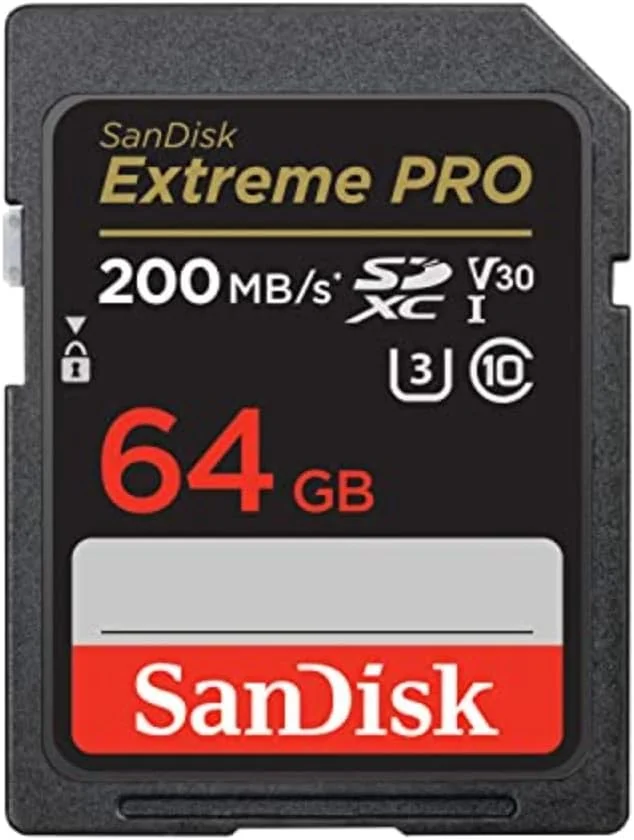
SanDisk Extreme PRO 64GB V30
SanDisk
SanDisk Extreme PRO 128GB V60
SanDisk
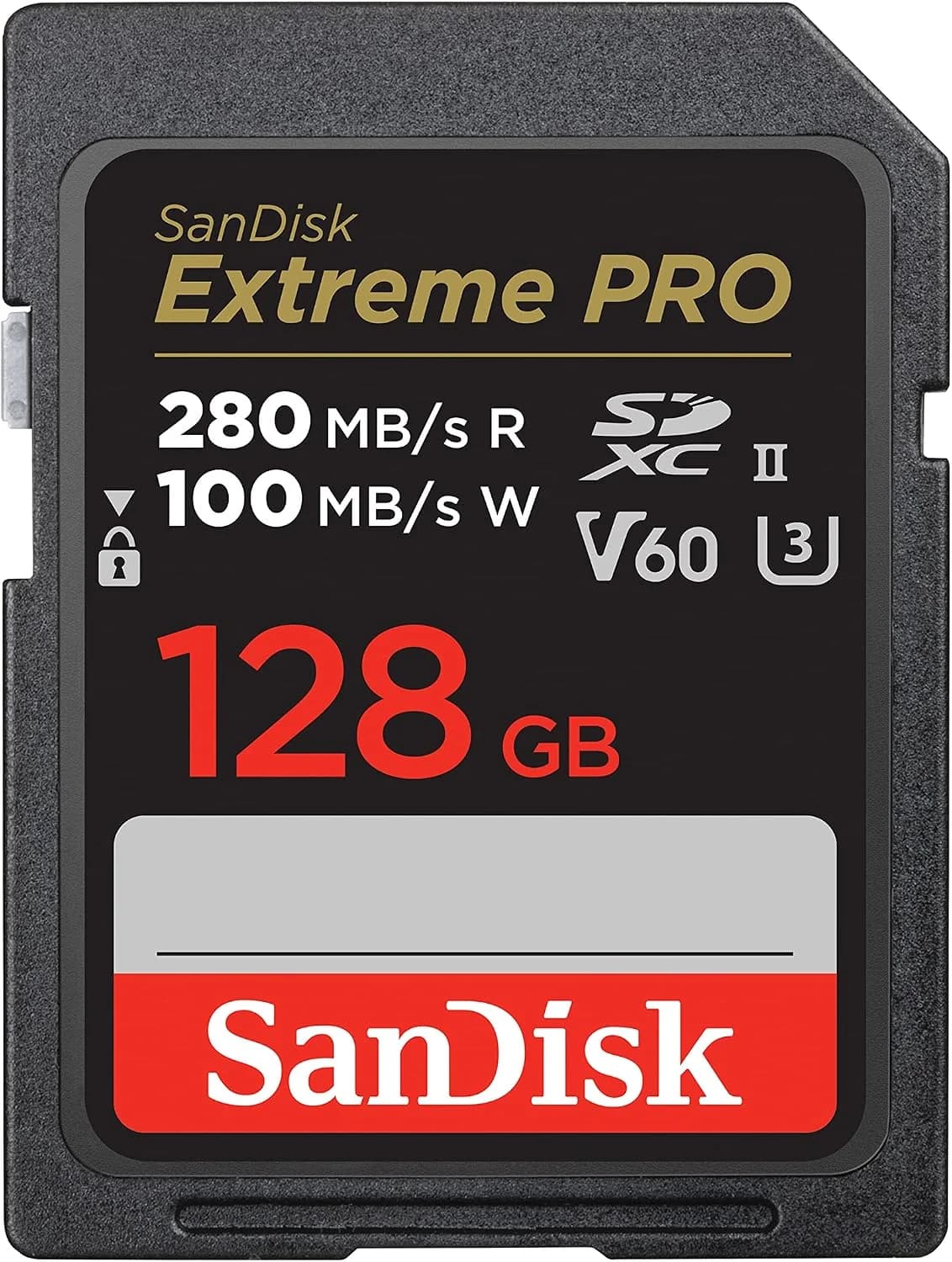
SanDisk Extreme PRO 128GB V90
Bild
SanDisk Extreme PRO 128GB V30
SanDisk Extreme PRO 64GB V30
SanDisk Extreme PRO 128GB V60
SanDisk Extreme PRO 128GB V90
EmpfehlungSweet SpotBudgetFast Photo/VideoPro Video
Sensor128GB (SDXC)64GB (SDXC)128GB (SDXC)128GB (SDXC)
ISO-BereichUHS-IUHS-IUHS-IIUHS-II
AutofokusV30 (30 MB/s min.)V30 (30 MB/s min.)V60 (60 MB/s min.)V90 (90 MB/s min.)
DetailU3U3U3U3
Stärken
  • +Enough for RAW + normal 4K on most cameras
  • +Solid value for money — even as a pair for dual-slot
  • +UHS-I — works in practically any SD slot
  • +128GB: enough for an event day without constant swapping
  • +The cheapest way into Extreme PRO V30
  • +Same speed class as the 128GB recommendation
  • +Good as a backup slot card or for short shoots
  • +Frees up the buffer faster on quick RAW bursts
  • +Matches S&Q and higher 4K bitrates (e.g., Sony A7 IV S&Q)
  • +More headroom than plain V30
  • +Covers high sustained write loads (All-Intra, etc.)
  • +Less risk on long high-bitrate clips
  • +Makes sense when the camera manual requires V90
Schwächen
  • No UHS-II — often too slow for high-bitrate All-Intra or S&Q
  • Not the choice for internal ProRes/RAW video
  • On extremely long bursts, the buffer can take a bit longer to clear
  • RAW + video fills 64GB up fast
  • Events: more card swaps, more risk
  • The price gap to 128GB is often small — then bigger makes more sense
  • More expensive — burns money without a real need
  • UHS-II does nothing in a pure UHS-I slot
  • For All-Intra / very high bitrates, V90 is often still required
  • Expensive — often overkill for normal 4K
  • No substitute for CFexpress in RAW-video / extreme 8K cases
  • The wrong pick if you only shoot photos
Geeignet fürEveryday photo work, events, business, travel — and normal 4K. Not sure? Get this one.Short sessions, tight budget, or as a second card alongside a bigger one.Heavy burst shooting + higher video speed, on a camera with a UHS-II slot.Pro video with All-Intra or very high bitrate — not a default for photo work.
Wo kaufen

Why so many buying guides push too hard toward V90 — and how you derive the right class from the bitrate in three steps — comes further down. First, the decision tree.

01
Decision

Which Path You Take

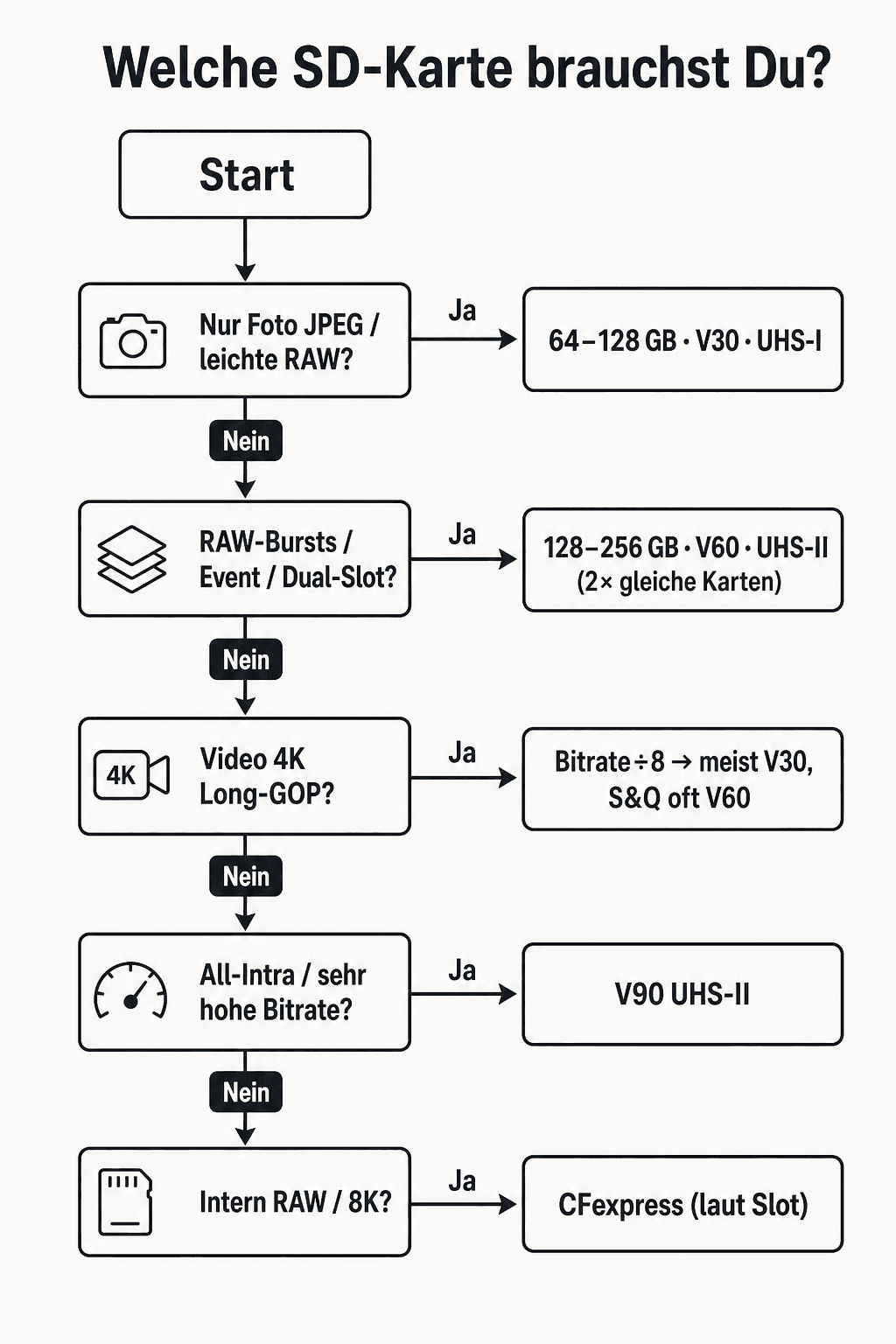
Instead of comparing spec sheets, walk the tree. At the top, your use case decides — photo, video, or both. At the bottom, you land on capacity and speed class. The diagram sums up the path:

Decision tree: which SD card for photo, video, and dual-slot
Decision tree — from use case to V30, V60, or V90
  • Photo only / normal 4K → 128GB V30 (sweet spot)
  • Short sessions, tight budget → 64GB V30
  • Fast RAW bursts, S&Q, higher 4K → 128GB V60 (UHS-II)
  • All-Intra / very high bitrate per the manual → 128GB V90
  • Internal RAW video / extreme 8K → look at CFexpress instead (briefly below)

Plan for two matching cards if your camera has dual-slot — especially for events. A backup card costs less than a lost job.

02
Basics

What Really Matters on a Card

Every package lists a dozen numbers. In practice, three things matter to you — in this order:

1. Capacity (GB)
How long you can shoot before swapping. RAW + 4K eats storage fast. For events and travel, 128GB is the sweet spot; 64GB works for short jobs; 256GB+ if you shoot long sessions or offload rarely. More on this in the Photography Travel Packing List.
2. Write speed
The critical value. It determines how fast the camera buffer clears and whether video runs without dropouts. The V-class (V30/V60/V90) is your anchor here — not the big "up to X MB/s" marketing number.
3. Read speed
Important for transferring to your computer — and therefore for your workflow after the shoot, e.g. on your PC for photo editing. For the actual recording, read speed is secondary.
FormatCapacityIn Practice
SDup to 2 GBIrrelevant for modern cameras
SDHC4–32 GBOnly a last-resort option now
SDXC64GB–2 TBStandard for photo & video
SDUC2 TB+Niche / future

SD formats — for 2026, practically always SDXC

Does the card fit the rest of your photography equipment? Yes — if slot type (UHS-I/II), capacity, and V-class match your use case. No — if you plug expensive UHS-II cards into a slot that only speaks UHS-I.

03
Symbols

C10, U3, V30 & Co. — Understood Once and for All

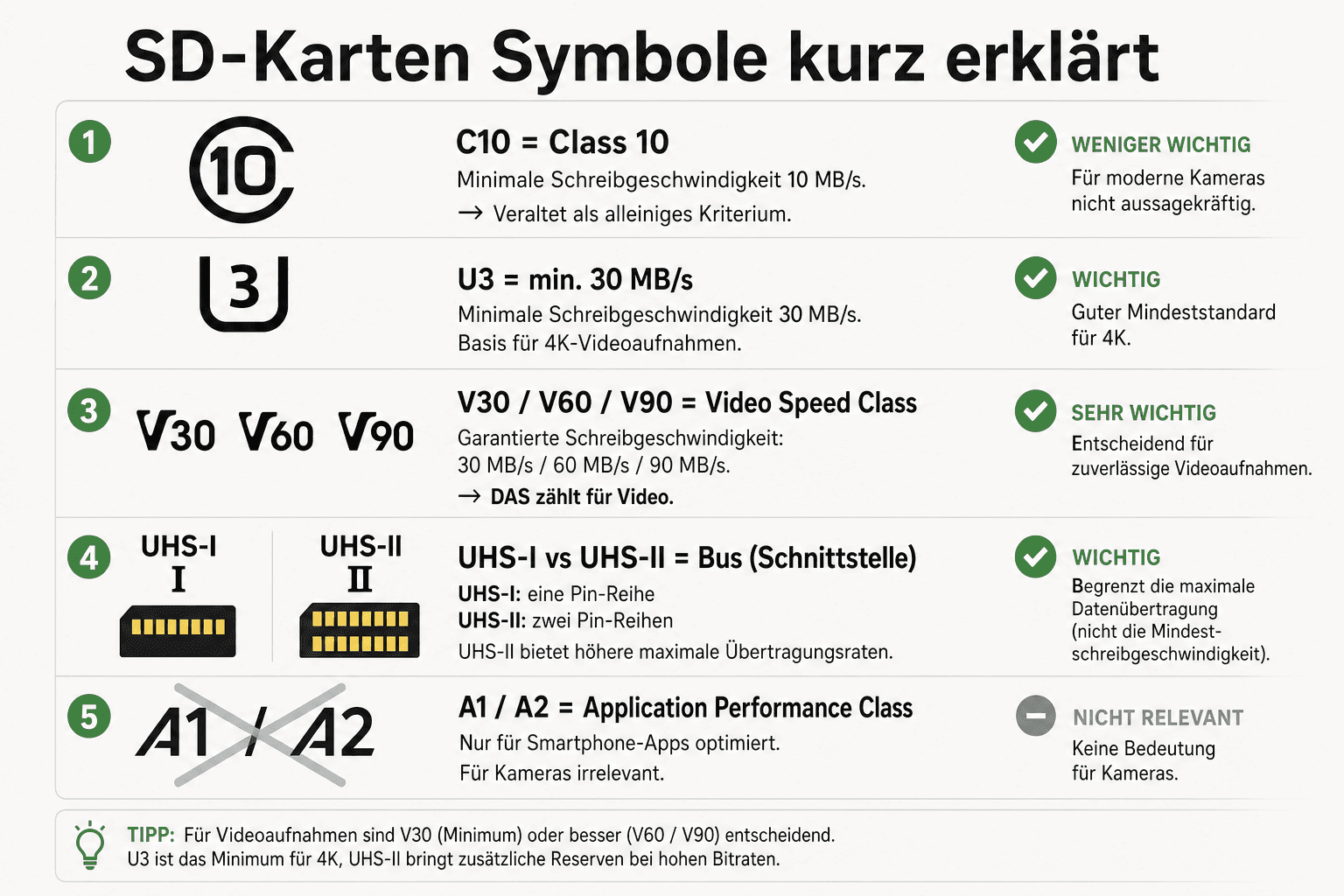
The icons printed on the card aren't decoration. They tell you which write speed is guaranteed. The diagram sorts the classes:

Overview of speed classes: C10, U1/U3, V30/V60/V90, and UHS-I/II
Speed classes at a glance — V-class is your video/burst anchor
MarkingMeaningGuaranteed WriteWhen It's Relevant
C10Class 1010 MB/sOutdated — too little information
U1UHS Speed Class 110 MB/sBasic Full HD at best
U3UHS Speed Class 330 MB/sMinimum for 4K-capable cards
V30Video Speed Class 3030 MB/sNormal 4K, everyday photo work
V60Video Speed Class 6060 MB/sS&Q, higher bitrate, fast bursts
V90Video Speed Class 9090 MB/sAll-Intra / very high bitrate
UHS-IOne contact rowLower bus limitWorks everywhere
UHS-IITwo contact rowsBus up to approx. 312 MB/sOnly if the slot supports UHS-II

Symbols and guarantee values — as of July 2026

UHS-I vs. UHS-II: UHS-II cards have two rows of contacts and can be noticeably faster — but only if your camera (or card reader) actually supports UHS-II. Otherwise the card falls back to UHS-I speed. Before buying: check the manual/specs for the slot.

04
Use Case

Photo vs. Video: Clear Recommendations

For Photography

For photo work, it's mostly about clearing the buffer after bursts. JPEG is undemanding. RAW — especially at 30+ megapixels and long bursts — needs speed and space. Whether you shoot RAW or JPEG also decides how much storage you'll need.

  • Entry-level / short jobs: 64GB V30 — affordable, often enough
  • Default (my recommendation): 128GB V30 UHS-I — events, business, travel
  • Heavy bursts / fast bodies: 128GB V60 UHS-II — if the slot keeps up

For a camera for beginners, V30 is usually the right league. Nobody starting out needs to buy V90 "for later" — later, you'll buy the card you actually need at that point.

For Video

For video, what matters is the sustained write load. Full HD is relaxed. 4K depends on your codec's bitrate — not on resolution alone. Many cameras only need V30 for normal 4K. V90 is not automatic.

  • Normal 4K (often ~100–200 Mbps): V30 is frequently enough (see calculator)
  • S&Q / higher bitrate: often V60 — example: Sony A7 IV
  • All-Intra / very high bitrate: V90, if the manual requires it
  • Vlogging / everyday YouTube: usually V30 — see also Vlog Camera for YouTube

Mixing photo and video? Go with whichever demand is higher — but calculate it. Blindly buying V90 just because "video" is printed on the box isn't a plan.

05
Math

Bitrate → V-Class: Doing the Math Right

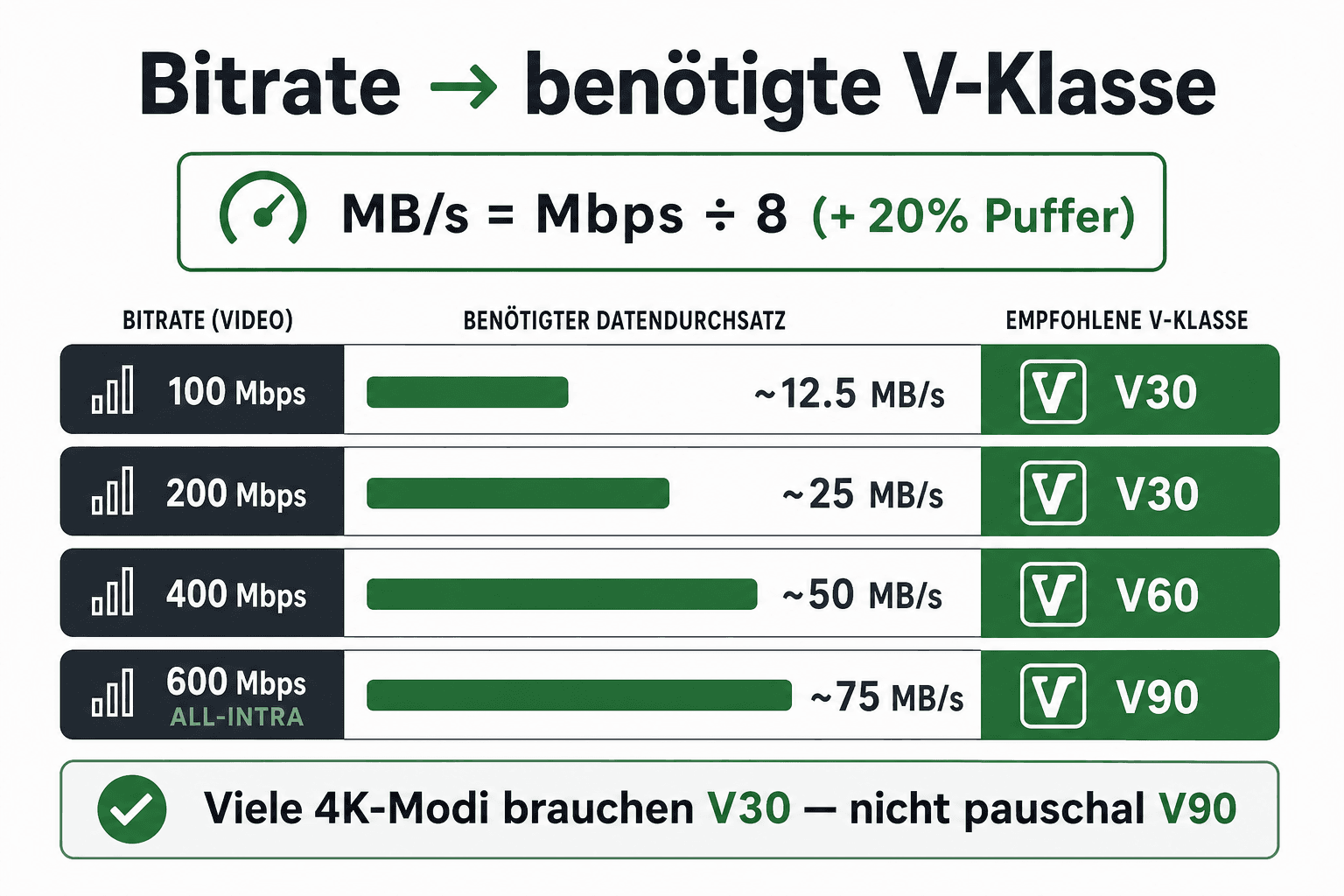
This is where many guides fail: they convert bitrate to MB/s correctly — and then still recommend the wrong V-class. Here's how you get it right:

Diagram: video bitrate in Mbps converted to MB/s and the matching V-class
Bitrate → MB/s → V-class — 200 Mbps sits at about 25 MB/s (V30 territory)
Step 1 — Find the bitrate
Check the manual or the camera menu under video quality. Unit: Mbps (megabits per second). Example: 4K at 200 Mbps.
Step 2 — Convert to MB/s
Divide by 8 (8 bits = 1 byte). 200 ÷ 8 = 25 MB/s. That's the amount of data that needs to be written per second.
Step 3 — Choose the V-class
The card must guarantee at least this sustained write speed. 25 MB/s → V30 (30 MB/s) is enough. With roughly 20% headroom, you're still at ~30 MB/s — still V30, not V90.
Bitrate (Mbps)÷ 8 = MB/sMatching V-ClassComment
100 Mbps12.5 MB/sV30Relaxed
200 Mbps25 MB/sV30Sweet spot for many 4K modes
400 Mbps50 MB/sV60Higher quality / near-All-I
600 Mbps+75+ MB/sV90Or consider CFexpress

A rule of thumb — always cross-check with the manual and your actual codec

200 Mbps is 25 MB/s. V30 guarantees 30 MB/s. Anyone who turns that into "buy V90" is selling you fear — not technology.

Martin Kleinheinz

One more thing: some modes (All-Intra, high S&Q rates) sit far above the "normal" 4K bitrate. So check the setting you actually use — not just "it says 4K on the box".

06
Events

Dual-Slot: Your Backup During the Shoot

At events and business jobs, there's no second take. A broken or full card isn't an annoyance — it's a professional risk. Many cameras have two slots. Use them.

Backup / simultaneous
Every photo (or video) writes to both cards in parallel. Maximum protection. My standard for events — see also Event Photography Tips.
Overflow
When slot 1 fills up, the camera keeps writing to slot 2. Practical for long days — but not a substitute for backup if one card fails.
Split photo / video
Photos on card 1, video on card 2. A tidy workflow — you'll need to handle backup differently (a second camera, an external recorder, fast offload).

The few extra dollars for the second card are nothing compared to the moment you'd have to tell a client their files are gone. On events, I sleep better with simultaneous writing — full stop.

And yes: cards belong in a case, not loose in your pocket next to your car keys. That's boring — and exactly why it works.

07
Caution

Fake Cards: How to Spot and Avoid Them

Counterfeit SD cards aren't an internet myth. They often report more storage than physically exists — or don't hold the advertised speed class. In the worst case, you lose data mid-job.

  • Buy from reputable retailers (known shops, official brand sellers) — not from an anonymous cheap listing offering "512GB for $12"
  • Reality-check the price: an Extreme PRO 128GB V30 around ~$50 is plausible; a fraction of that for the same spec is a red flag
  • Check the packaging and hologram — poor print quality, crooked logos, serial numbers that look off
  • After buying: test capacity and speed with tools (e.g., H2testw / F3 on a desktop) — especially if something feels off
  • Check the camera firmware and the manufacturer's card list — some bodies list tested cards

For work: format new cards in the camera before the first job, put them under test load (bursts + a short 4K clip), then use them for real. Five minutes of testing beats five hours of data recovery.

08
Outlook

CFexpress — Only When You Outgrow SD

Short and honest: most readers of this article don't need a CFexpress card. SD with V30–V90 covers photo work and normal-to-demanding 4K. CFexpress becomes relevant when you shoot internal RAW video, extreme 6K/8K, or very high burst loads — and your camera has the matching slot.

  • CFexpress Type A — used by some Sony bodies (smaller form factor)
  • CFexpress Type B — used by Canon/Nikon high-end bodies (larger, often even faster)
  • Significantly more expensive than SD — and only worthwhile with a matching slot and real bitrate demand
09
Comparison

Four Cards At a Glance + Verdicts

Same family, four clear roles. Read the table, then the verdicts — and buy the path that matches your use case.

ModelCapacityBusV-ClassPrice Approx.Ideal For…
Extreme PRO 128GB V30128GBUHS-IV30$50Default photo + normal 4K
Extreme PRO 64GB V3064GBUHS-IV30$35Budget / short jobs
Extreme PRO 128GB V60128GBUHS-IIV60$130Bursts, S&Q, higher 4K
Extreme PRO 128GB V90128GBUHS-IIV90$240All-Intra / pro video

As of July 2026 — check exact prices and specs at the store

Sweet Spot: 128GB V30

My standard recommendation for photographers shooting events, business, or travel who occasionally need normal 4K. Value for money checks out — and as a dual-slot pair, it stays affordable.

Sweet Spot
SanDisk Extreme PRO 128GB V30
Bewertung
4.8
/ 5,0
★★★★
Basierend auf 0 verifizierten Bewertungen
SanDisk

SanDisk Extreme PRO 128GB V30

Sweet Spot — the card for most photographers

UHS-I SDXC with Video Speed Class V30 (guarantees 30 MB/s write). 128GB for everyday RAW and normal 4K. Typically around $50 — enough speed for bursts and standard video without the UHS-II premium. My default recommendation for events, business, and travel.

Was überzeugt
  • +Enough for RAW + normal 4K on most cameras
  • +Solid value for money — even as a pair for dual-slot
  • +UHS-I — works in practically any SD slot
  • +128GB: enough for an event day without constant swapping
Was Du wissen solltest
  • No UHS-II — often too slow for high-bitrate All-Intra or S&Q
  • Not the choice for internal ProRes/RAW video
  • On extremely long bursts, the buffer can take a bit longer to clear
Editor's Statement

Happy path: buy once, grab two for dual-slot

Verfügbar bei

Budget: 64GB V30

Same speed class, less room. Sensible as a starting point or a second card — not as the only card for a long event day.

Budget
SanDisk Extreme PRO 64GB V30
Bewertung
4.7
/ 5,0
★★★★
Basierend auf 0 verifizierten Bewertungen
SanDisk

SanDisk Extreme PRO 64GB V30

Budget — same speed class, less capacity

The same UHS-I V30 logic as the sweet spot, just at 64GB. Typically around $35 — makes sense as a second card, for short shoots, or if you offload to your computer often anyway. Not the first choice for a long event day.

Was überzeugt
  • +The cheapest way into Extreme PRO V30
  • +Same speed class as the 128GB recommendation
  • +Good as a backup slot card or for short shoots
Was Du wissen solltest
  • RAW + video fills 64GB up fast
  • Events: more card swaps, more risk
  • The price gap to 128GB is often small — then bigger makes more sense
Editor's Statement

Only choose this if 64GB genuinely covers you

Verfügbar bei

Fast Photo/Video: 128GB V60

When UHS-II applies and you noticeably need more write speed — S&Q, hard bursts, higher bitrate. Don't buy it "just in case" if V30 already handles your load.

Fast Photo/Video
SanDisk Extreme PRO 128GB V60
Bewertung
4.7
/ 5,0
★★★★
Basierend auf 0 verifizierten Bewertungen
SanDisk

SanDisk Extreme PRO 128GB V60

Fast photo/video — UHS-II with V60

UHS-II SDXC with V60 (60 MB/s guaranteed). Typically around $130. For fast RAW bursts, S&Q, and more demanding 4K — when your camera actually uses UHS-II. Noticeably pricier than V30: only buy this if you have the speed need.

Was überzeugt
  • +Frees up the buffer faster on quick RAW bursts
  • +Matches S&Q and higher 4K bitrates (e.g., Sony A7 IV S&Q)
  • +More headroom than plain V30
Was Du wissen solltest
  • More expensive — burns money without a real need
  • UHS-II does nothing in a pure UHS-I slot
  • For All-Intra / very high bitrates, V90 is often still required
Editor's Statement

Only if your camera has UHS-II + a real higher-bitrate need

Verfügbar bei

Pro Video: 128GB V90

A targeted choice for All-Intra and high sustained bitrates. For pure photo work and normal 4K, usually overkill — better to buy two V30 cards for dual-slot instead.

Pro Video
SanDisk Extreme PRO 128GB V90
Bewertung
4.6
/ 5,0
★★★★
Basierend auf 0 verifizierten Bewertungen
SanDisk

SanDisk Extreme PRO 128GB V90

Pro video — when the bitrate is genuinely high

UHS-II SDXC with V90 (90 MB/s guaranteed). Typically around $240. For All-Intra, high 4K/6K bitrates, and modes where the manual explicitly requires V90. Not "just in case for everything" — a targeted pro-video choice.

Was überzeugt
  • +Covers high sustained write loads (All-Intra, etc.)
  • +Less risk on long high-bitrate clips
  • +Makes sense when the camera manual requires V90
Was Du wissen solltest
  • Expensive — often overkill for normal 4K
  • No substitute for CFexpress in RAW-video / extreme 8K cases
  • The wrong pick if you only shoot photos
Editor's Statement

Only for All-Intra / high bitrate per the manual

Verfügbar bei
10
Verdict

Buy the Card That Matches Your Bitrate

The best SD card for your camera isn't the most expensive one with the biggest print on the box. It's the one that sustains your write load consistently — and, in dual-slot, backs up your files twice over.

For most people: SanDisk Extreme PRO 128GB V30. Budget: 64GB V30. More speed for bursts/S&Q: V60. All-Intra / manual-required V90: V90. CFexpress only once you genuinely outgrow SD.

Divide bitrate by 8, choose the matching V-class, buy two matching cards if you need them — and skip the V90 reflex "just to be safe". Safety at events means backup, not overspending.

11
FAQ

Common Questions About SD Cards for Cameras

Which is the best SD card for most cameras in 2026?
For everyday photo work and normal 4K: SanDisk Extreme PRO 128GB V30 (UHS-I). It hits the right balance of capacity, speed, and price. V60/V90 only if your bitrate or manual requires it.
Is V30 enough for 4K video?
Often, yes. 200 Mbps ÷ 8 = 25 MB/s — V30 guarantees 30 MB/s. Many cameras (for example, the Sony A7 IV in normal 4K) handle that fine. S&Q or All-Intra may need V60 or V90 — always check the bitrate and manual.
Do I really need a V90 card?
Only if your setting has a high sustained write load (e.g., All-Intra) or the manufacturer requires V90. For normal 4K and photo work, V90 is often overkill.
UHS-I or UHS-II — which should I buy?
UHS-I works in practically any slot and is enough with V30 for many setups. UHS-II is worth it if your slot supports it and you actually use V60/V90 speed. Otherwise you're paying for bus speed the camera never taps into.
How big should an SD card be for events?
128GB is the sweet spot for many event days shooting RAW. Pair it with dual-slot backup mode using two matching cards. 64GB forces earlier swaps — unnecessarily risky.
What does dual-slot backup mean exactly?
The camera writes every photo (or video) to two cards in parallel. If one fails, you still have the second. Standard practice at events — cheaper than data loss.
How do I spot counterfeit SD cards?
Unrealistically cheap "huge capacity" listings, dubious sellers, poor packaging. Test capacity after buying. When in doubt, buy branded goods from reputable retailers — not the $12 miracle card.
When is CFexpress worth it over SD?
When you shoot internal RAW video, extreme 6K/8K, or very high burst loads and your camera has the CFexpress slot. For classic photo work and normal 4K, stick with SD.
Should I format SD cards in the camera?
Yes — format in the exact camera you'll use before your first job. This reduces compatibility issues. Test with a burst and a short video clip before your first shoot.
Is 64GB enough for getting started?
Often yes for short shoots and JPEG. For RAW events and video, you'll run tight quickly. If the price gap to 128GB is small, go bigger.
Affiliate links marked with * — Amazon product links use partner ID martinkleinheinz-21. I earn a small commission if you buy through these links; there's no extra cost to you. The recommendations are based on hands-on practice and manufacturer specs — no brand sponsored this article.
Newsletter

Stay in the loop.

Camera and photography news, honest gear tests and new articles — in your inbox. Infrequent but relevant. No spam, unsubscribe anytime.

Keep reading

From the journal.

Fotograf, Martin Fernando Mera Kleinheinz · Franz-Bork-Straße 21, 30163 Hannover · 0179 4085297