Laptop for Photo Editing 2026: A Guide for Photographers
Which laptop for Lightroom and Photoshop? RAM, display, Mac vs. Windows — explained honestly, with two concrete Amazon recommendations that actually make sense in 2026.
Author
Martin Kleinheinz
Photographer · Hannover
Updated
August 22, 2026
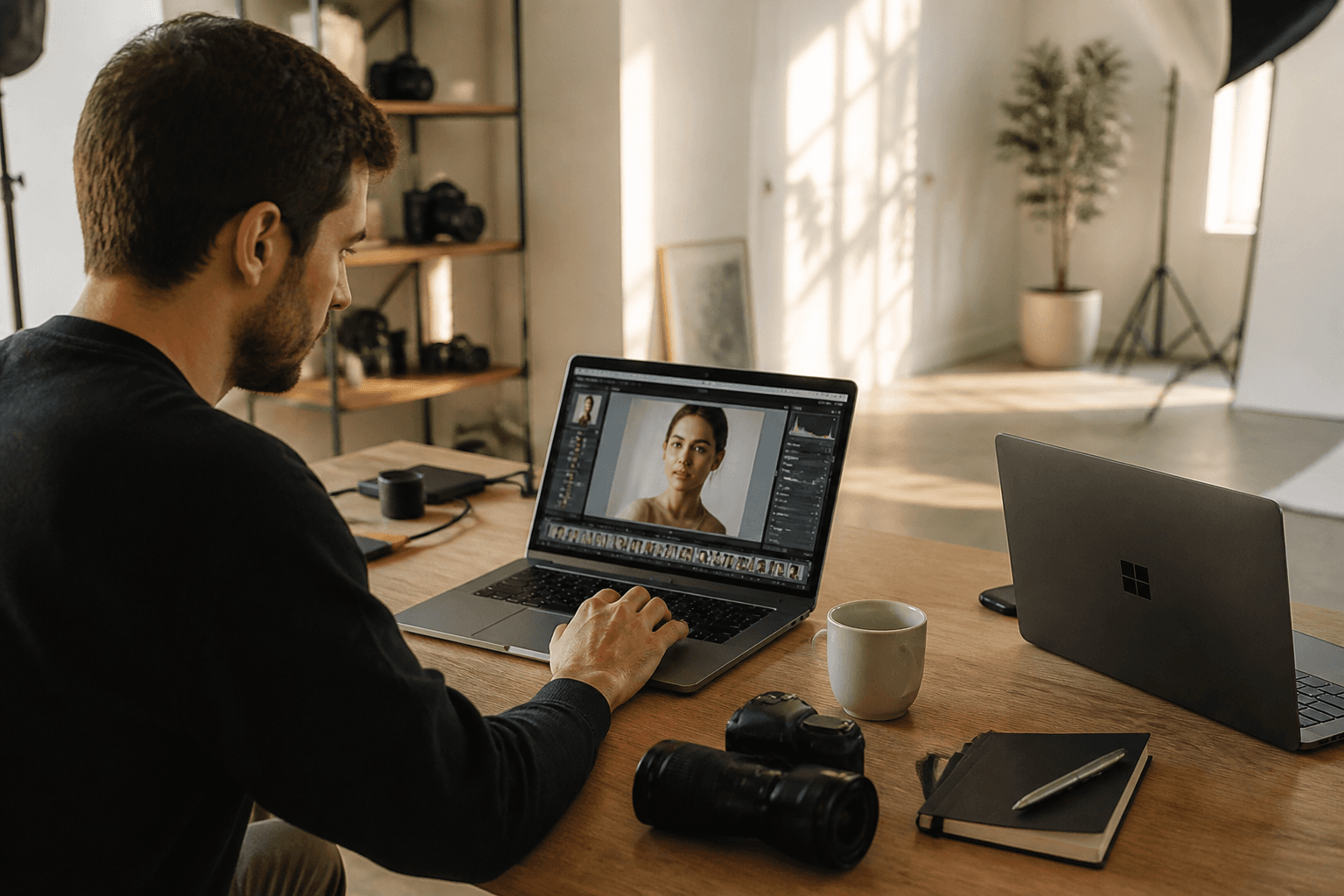
A laptop for photo editing sounds like freedom: catalog at the kitchen table, export in the hotel, client looking over your shoulder at the display. In practice, it rarely fails because of missing megahertz — but because of 16 GB RAM collapsing with 800 RAWs and Chrome open, gaming displays without sRGB, and the belief that Adobe minimum specs are buying advice.
Most guides online are outdated in 2026 (M3, RTX 40, "16–32 GB is enough") or sell software instead of hardware (Luminar, cloud editing). This guide does the opposite: workflow first, then components, then two concrete models — a MacBook Pro M5 Pro and an ASUS ProArt P16 from Amazon, because both are built for photographers, not Fortnite.
If you sit in the studio permanently and use an external monitor: the PC for photo editing guide is often the better choice — cheaper, upgradeable, quieter under sustained load. This article is for everyone who must or wants to edit mobile.
00
Quick recommendation
Two laptops you can't go wrong with
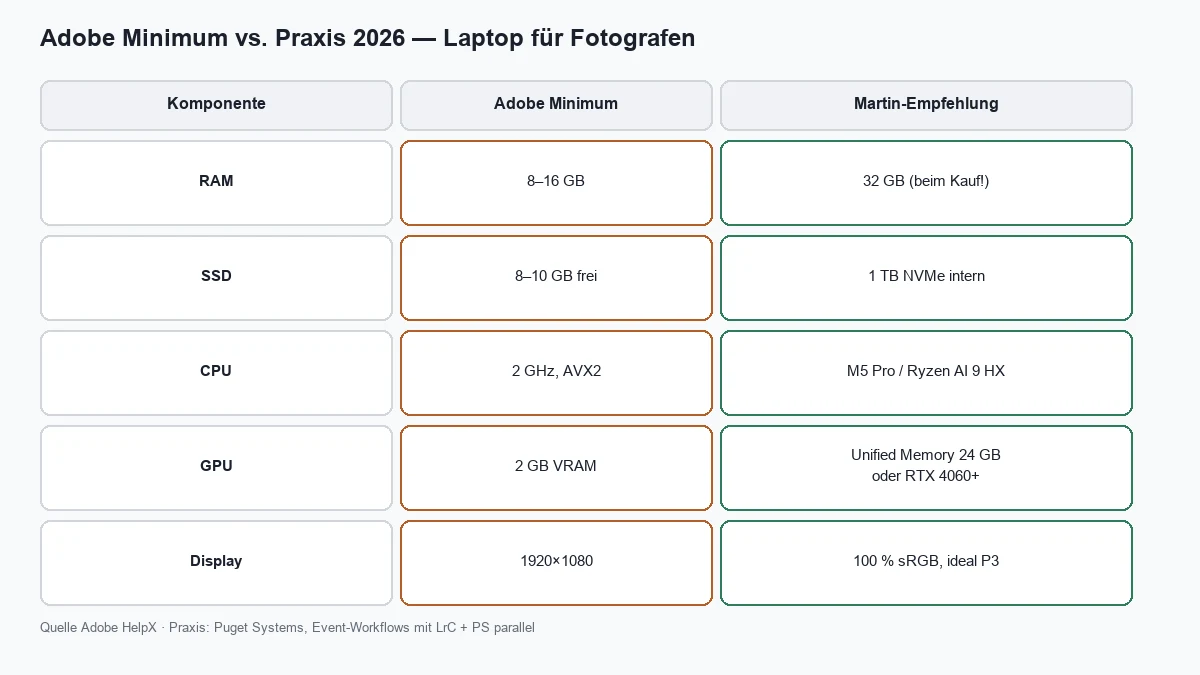
No time for 24 minutes? Here's the short version: in 2026 you need 32 GB RAM and 1 TB SSD — at purchase, not "later." Adobe says 16 GB; Puget Systems, event photographers and I say: that's enough for hobby, not for a real workflow with Lightroom Classic + Photoshop + browser + cloud.
My two top picks 2026
MacBook Pro M5 Pro · ASUS ProArt P16
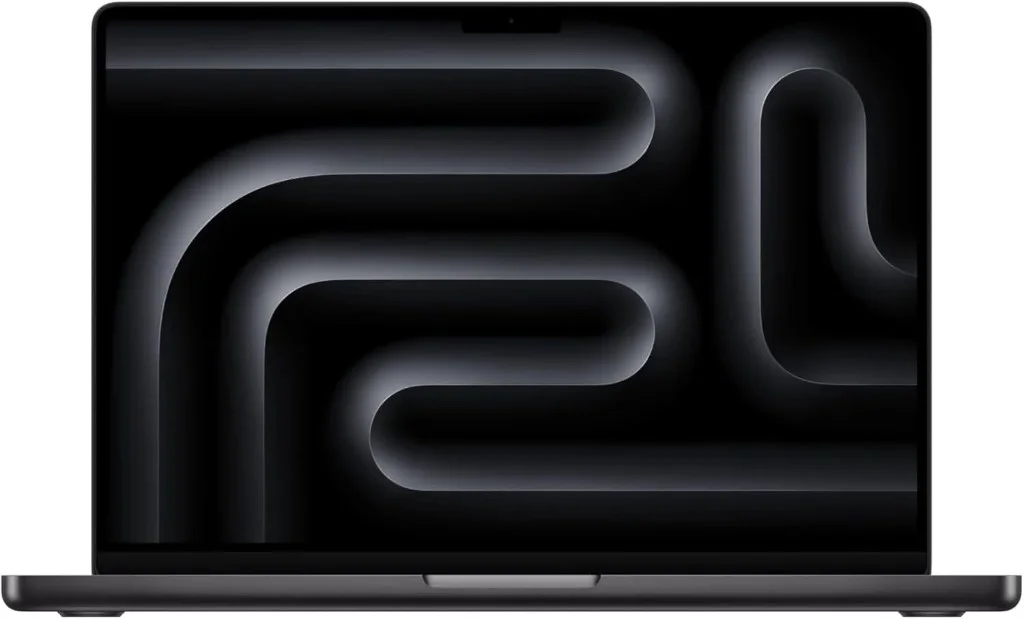
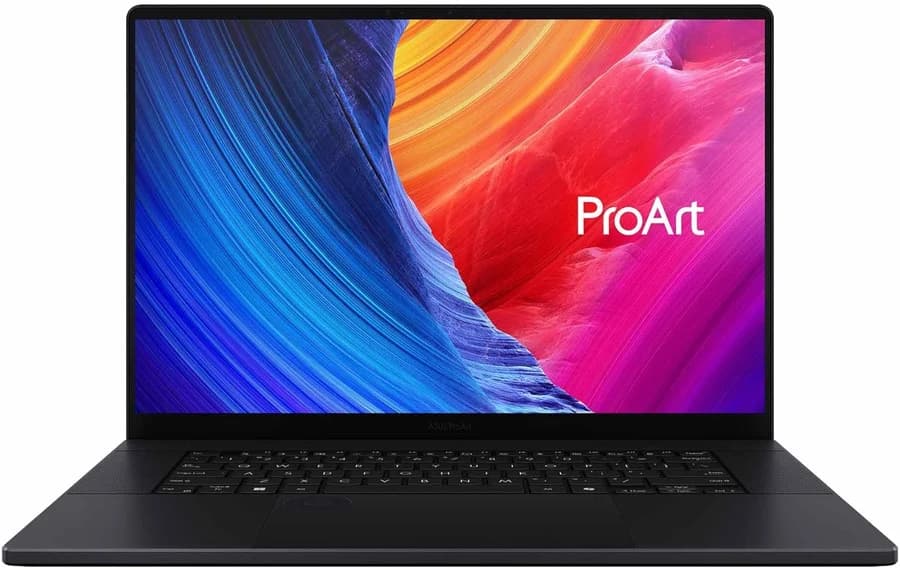
**Left:** Apple — fastest Adobe notebook according to PugetBench, ideal if you're in the Apple ecosystem or want maximum mobility. **Right:** Windows — 4K OLED with Pantone validation, RTX 4060 for AI tools, Capture One and DxO. Both on Amazon DE* — details in sections 04–06.
Vergleich
Apple
Apple MacBook Pro 14" · M5 Pro · 24 GB · 1 TB
ASUS
ASUS ProArt P16 · Ryzen AI 9 · RTX 4060 · 32 GB
Bild
Empfehlung
Top Pick Mac
Top Pick Windows
Sensor
Apple M5 Pro · 15-Core CPU · 16-Core GPU
AMD Ryzen AI 9 HX 370 · NPU 50 TOPS
ISO-Bereich
14.2" XDR · P3 · up to 1,600 nits HDR
NVIDIA RTX 4060 Laptop · 8 GB VRAM
Autofokus
24 GB unified (choose at purchase!)
16" 4K OLED Touch · Pantone · ΔE <1
Detail
1 TB SSD · 3× Thunderbolt 5
32 GB LPDDR5X · 1 TB NVMe
Stärken
+PugetBench leader for Lightroom & Photoshop
+Quiet, long battery life even under load
+P3 display — good for color work on the road
+Seamless with iPhone/iPad (AirDrop, iCloud)
+Pantone-validated 4K OLED — ideal for color decisions
+32 GB RAM from the factory — no 16 GB trap
+Windows: Capture One, DxO, full plugin world
+Lighter than 16" MacBook Pro (~1.83 kg)
Schwächen
−RAM/SSD not upgradeable — plan for 24 GB minimum
−More expensive than comparable Windows creator laptops
−Capture One / some Windows-only tools missing
−Adobe benchmarks behind M5 Pro (PugetBench)
−OLED: PWM/reflections — check before buying
−Battery under full load noticeably shorter than Mac
Geeignet für
Mobile pros, Adobe workflow, travel editing, Apple ecosystem.
Windows users, Capture One, OLED color work, CUDA/Topaz.
A laptop is always a compromise. You pay more per unit of performance, lose upgradeability, and under sustained load almost every chassis throttles eventually. Still, it pays off when mobility is part of your job: wedding photographer Sunday evening in the hotel, travel photographer with catalog in the lodge, business photographer at the client with instant preview.
If you work 90% at a desk with a calibrated 27" monitor, read the PC guide first. A Memory PC or Mac mini delivers more performance per euro — and you connect the same monitor for photo editing. The laptop becomes a second device for travel, not the main tool.
You are …
Recommendation
Fixed in studio, monitor available
Desktop PC or Mac mini + laptop optional
50/50 studio & on the road
Performance laptop + dock + external monitor at home
Almost only mobile
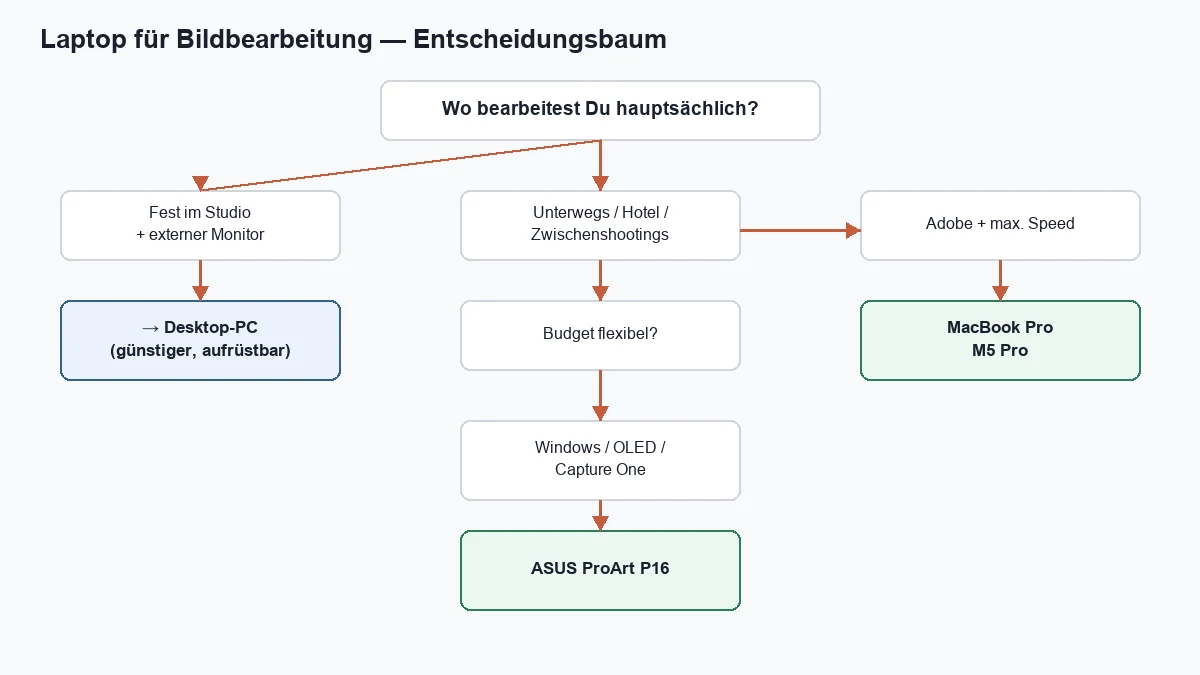
MacBook Pro M5 Pro or ProArt P16 — see below
Hobby, 200 photos/month
Used MacBook Air M2/M3 or solid 32 GB Windows notebook
Laptop vs. desktop — honest context
02
Components
What really matters — and in what order
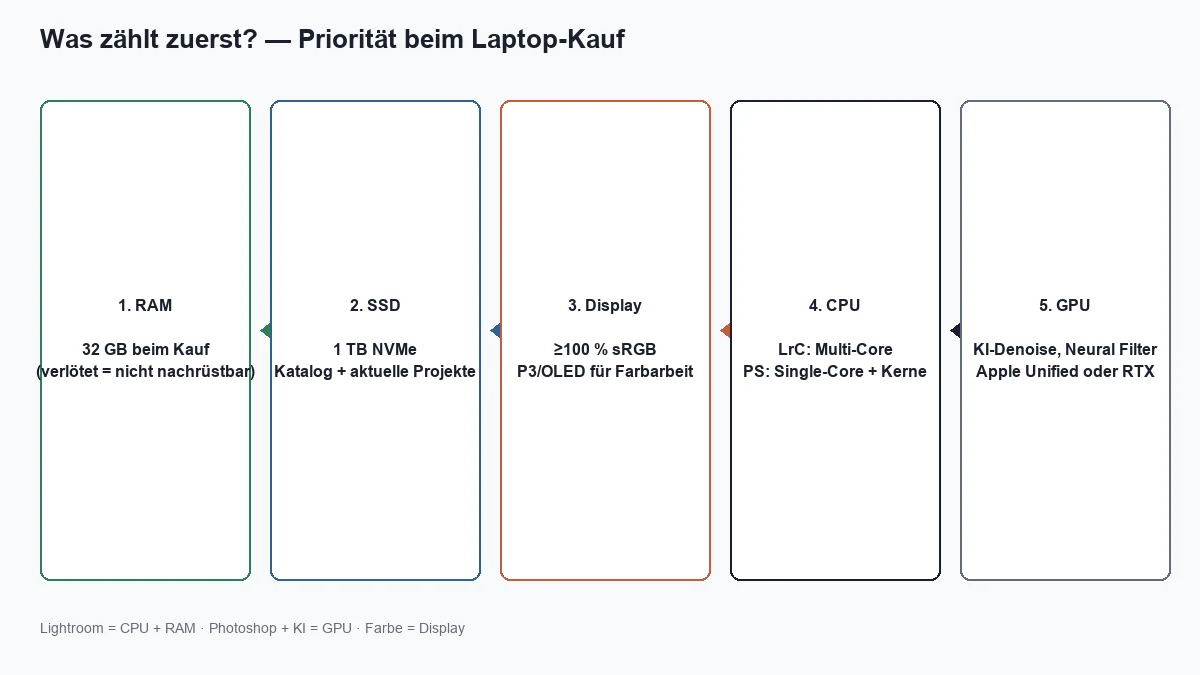
Competing articles list specs like a shopping list: CPU here, GPU there. More useful is priority by bottleneck: what slows you down first? With Lightroom Classic it's RAM, CPU and SSD — with Photoshop and AI filters, GPU/VRAM joins the list. An expensive RTX 5090 notebook with 16 GB RAM is worse built in 2026 than an M5 Pro with 24 GB unified memory.
Buying priority for photographers — not the manufacturer marketing order
Adobe HelpX vs. real photo workflow — source Adobe, Puget Systems
RAM: 32 GB — non-negotiable
Lightroom Classic keeps catalog previews, Smart Previews and export queues in memory. Photoshop puts large files in scratch disk storage — on the SSD when RAM runs low. 16 GB works for 50 vacation photos; with 800 RAWs after a wedding, Chrome with 20 tabs and Dropbox in the background, the system stutters.
The catch in 2026: RAM is soldered on most laptops. Apple unified memory, ProArt LPDDR5X, Dell XPS — all decided at purchase. "16 GB first, upgrade later" almost never works on ultrabooks. 32 GB now or buy again in two years.
SSD: 1 TB minimum
Your Lightroom catalog, Camera Raw cache, Photoshop scratch disk and current projects compete for the same internal SSD. Adobe recommends 100 GB free space for Photoshop — for cache and scratch alone. 1 TB internal is the sweet spot; archive on external NVMe SSD (SD card & backup workflow).
CPU & GPU — Lightroom vs. Photoshop
Lightroom Classic benefits from many cores during import, preview generation and export — PugetBench LrC 1.0 tests exactly that plus AI Denoise. Photoshop wants strong single-core performance for brushes, masks and layers — and GPU for Neural Filters, Generative Fill and AI tools. Apple M5 Pro combines both in unified memory; Windows needs dedicated RTX from 4060 (8 GB VRAM) for AI-heavy workflows.
03
Display
Color on a laptop — more than sRGB
You can shoot with the sharpest lens in the world — if your display lies, your export lies. Laptop panels are factory settings, not calibrated forever. OLED drifts, IPS displays vary with brightness. For critical color: calibrate (Spyder, Calibrite) or use an external monitor.
Panel type
Photo advantage
Disadvantage
IPS (matte)
Stable, low reflection
Often only ~99% sRGB
OLED (glossy)
Deep black, P3, HDR
Reflections, PWM on some models
Mini-LED (MacBook XDR)
High brightness, P3
Premium price
Display technologies — no "best", only the right panel
Minimum: 100% sRGB coverage — for web, social, most clients. Better: DCI-P3 or Pantone validated (ProArt, MacBook XDR) — for print prep and brand colors. Brightness: 400 nits+ for editing by a window; MacBook XDR and ProArt OLED deliver significantly more.
Factory settings are enough for culling on the road — not for final delivery. Don't make critical skin tone decisions on an uncalibrated laptop in a hotel. At home: dock → calibrated monitor → switch profile.
Lightroom Presets9 film looks inspired by Portra, Kodak & Fuji —View pack →
04
Platform
MacBook vs. Windows creator — benchmarks & practice
The religious debate is almost obsolete in 2026 — both platforms deliver professional results. The question is: which software, which ecosystem, which budget? Adobe runs natively on both; Capture One and DxO are preferred by many Windows users. Apple users with iPhone benefit from AirDrop, Handoff and iCloud Photos.
Criterion
MacBook Pro M5 Pro
ASUS ProArt P16 (RTX 4060)
Adobe LrC / PS (PugetBench)
Top — ahead of RTX 5090 laptops
Solid, behind Apple
Display
XDR Mini-LED, P3, matte optional
4K OLED touch, Pantone, ΔE <1
RAM
24 GB unified (at purchase)
32 GB from factory
Upgradeability
None
SSD sometimes dual (check model)
Battery under load
Very long
Shorter — plan for power adapter
Entry price DE
from ~€2,600
from ~€2,200 (Amazon configs)
Mac vs. Windows creator — August 2026
Notebookcheck compared PugetBench Photoshop 1.0.6: MacBook Pro M5 Max ~15,875 points vs. RTX 5090 laptop ~10,096 — Apple dominates Adobe. For pure Adobe photo performance, the MacBook Pro 2026 is hard to beat. The ProArt P16 wins when you need Windows, want OLED color accuracy, use Capture One or run CUDA/Topaz with dedicated RTX — at a fair price.
My recommendation: Adobe-only, mobile, Apple iPhone in use → MacBook Pro 14" M5 Pro, 24 GB, 1 TB. Windows, OLED, Capture One or budget with 32 GB → ASUS ProArt P16 RTX 4060. Both below as affiliate matrix — not the only options in the world, but safe defaults* if you don't want to compare for weeks.
Concrete buying recommendation
MacBook Pro M5 Pro · ASUS ProArt P16
Two models I recommend in practice — with direct link to Amazon*. Prices and availability change; double-check RAM, SSD and GPU performance before buying.
Vergleich
Apple
Apple MacBook Pro 14" · M5 Pro · 24 GB · 1 TB
ASUS
ASUS ProArt P16 · Ryzen AI 9 · RTX 4060 · 32 GB
Bild
Empfehlung
Top Pick Mac
Top Pick Windows
Sensor
Apple M5 Pro · 15-Core CPU · 16-Core GPU
AMD Ryzen AI 9 HX 370 · NPU 50 TOPS
ISO-Bereich
14.2" XDR · P3 · up to 1,600 nits HDR
NVIDIA RTX 4060 Laptop · 8 GB VRAM
Autofokus
24 GB unified (choose at purchase!)
16" 4K OLED Touch · Pantone · ΔE <1
Detail
1 TB SSD · 3× Thunderbolt 5
32 GB LPDDR5X · 1 TB NVMe
Stärken
+PugetBench leader for Lightroom & Photoshop
+Quiet, long battery life even under load
+P3 display — good for color work on the road
+Seamless with iPhone/iPad (AirDrop, iCloud)
+Pantone-validated 4K OLED — ideal for color decisions
+32 GB RAM from the factory — no 16 GB trap
+Windows: Capture One, DxO, full plugin world
+Lighter than 16" MacBook Pro (~1.83 kg)
Schwächen
−RAM/SSD not upgradeable — plan for 24 GB minimum
−More expensive than comparable Windows creator laptops
−Capture One / some Windows-only tools missing
−Adobe benchmarks behind M5 Pro (PugetBench)
−OLED: PWM/reflections — check before buying
−Battery under full load noticeably shorter than Mac
Geeignet für
Mobile pros, Adobe workflow, travel editing, Apple ecosystem.
Windows users, Capture One, OLED color work, CUDA/Topaz.
The laptop alone is rarely the complete solution. Pros work hybrid: cull and develop on the road, finalize at home on a dock with a large monitor. Three topics decide whether that works or gets frustrating.
Dock & external monitor
A Thunderbolt 4/5 dock (CalDigit, Anker, Apple) connects monitor, LAN, external SSD and power with one cable. Look for 140 W Power Delivery if you use a MacBook Pro M5 Pro — otherwise the battery drains during export despite the adapter. For the monitor: monitor for photo editing — 10-bit chain via DisplayPort/HDMI 2.1.
Thermal throttling
Thin chassis reduce clock speed under sustained load — export of 500 RAWs, batch AI denoise. That's normal, not a defect. M5 Max in 14" chassis throttles more than in 16" (Notebookcheck). Plan exports on power, not on battery. Gaming laptops often cool better, but louder.
Travel workflow
Smart Previews instead of full catalog on the plane. Two memory cards or immediate backup to external SSD. AI denoise on power — on battery it eats battery and time. No final color decisions in the hotel; developing yes, delivery at home on calibrated monitor.
If you want to buy now and not compare for three more weeks: MacBook Pro M5 Pro or ASUS ProArt P16 in the matrix above — both are, in my experience, the safest defaults for availability, specs and target audience in 2026. Everything else is fine-tuning.
07
Budget
Laptop under €1,000 — what actually works?
Under €1,000 you won't buy a MacBook Pro M5 Pro or ProArt P16 in 2026 — but you can still edit sensibly if you set compromises consciously. Most budget guides list gaming notebooks with 16 GB and TN displays; that's risky for client delivery. Here the two most common searches separated — photo and video — because requirements aren't identical.
Laptop photo editing under €1,000
Honest context: Adobe recommends 16 GB — and that's exactly the problem. Under €1,000 you almost only find 16 GB RAM (new) or 32 GB only on sales, B-stock or used. For hobby (200 photos/month, LrC alone, no PS with 50 layers) 16 GB is enough. For weddings, large catalogs or LrC + Photoshop parallel: used with 32 GB beats new with 16 GB — every time.
Priority
Under €1,000
Compromise
RAM
32 GB (used/sale) or 16 GB (hobby)
No 8 GB — neither new nor used
SSD
512 GB minimum, 1 TB ideal
Catalog external, clear cache regularly
Display
Check 100% sRGB in spec sheet
Finalize colors at home on monitor
CPU
Ryzen 7 / Intel i5 (H-series) or Apple M1/M2
No Celeron, no Pentium
GPU
Integrated enough for LrC
RTX only bonus, not instead of RAM
Laptop photo editing under €1,000 — buying priority
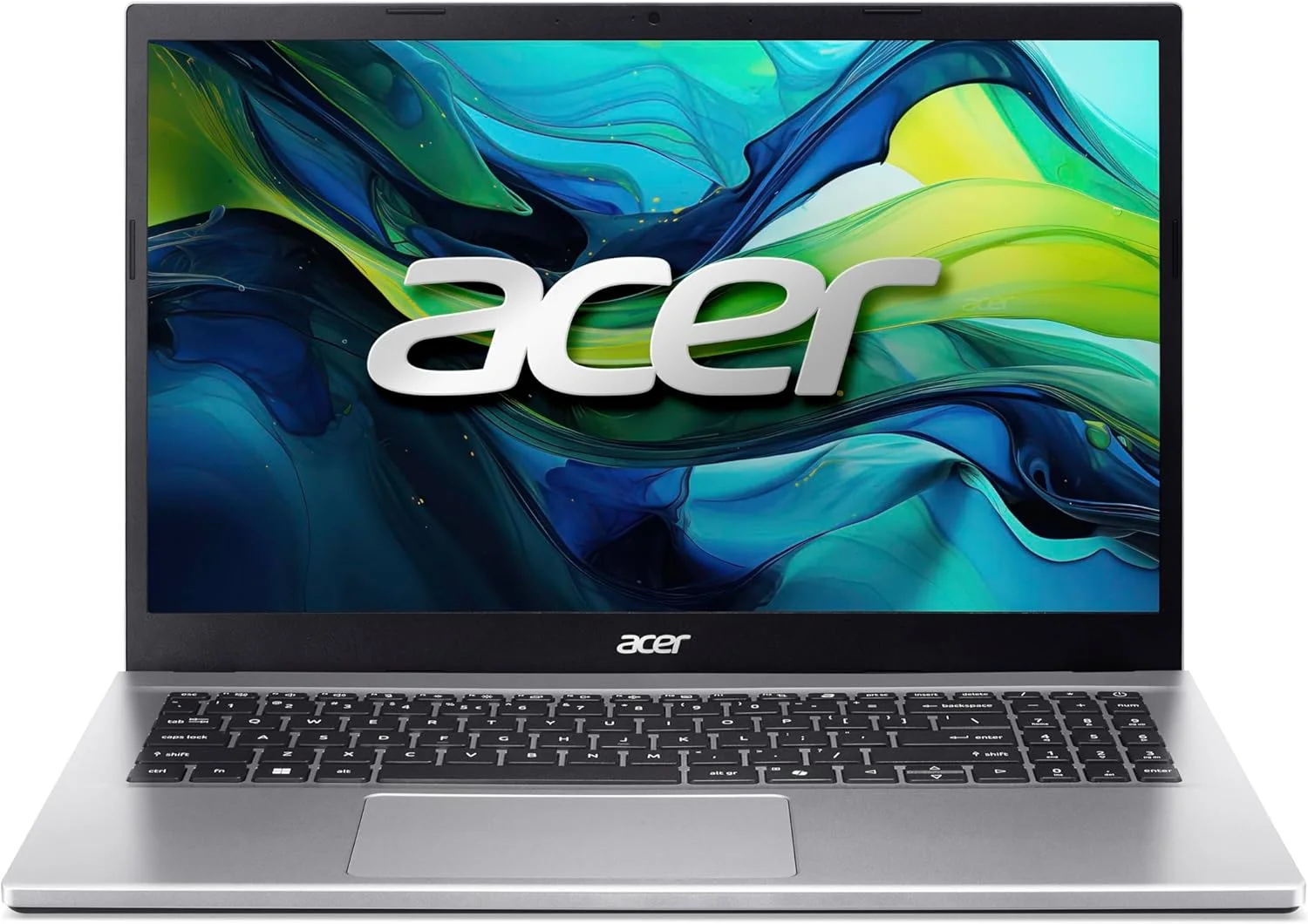
My Amazon recommendation under €1,000: The Acer Aspire Go 15 (Ryzen 7, 32 GB, 1 TB) — often from ~€699 on Amazon DE*. 32 GB from the factory is rare under €1,000; integrated graphics is enough for Lightroom Classic. Check display spec before buying — finalize colors on external monitor.
Concrete recommendation · Amazon DE*
Acer Aspire Go 15 · 32 GB · 1 TB
32 GB RAM and 1 TB SSD from the factory — under €1,000 my clear tip for Lightroom and light Photoshop, without the typical 16 GB gaming laptop trap.
Vergleich
Acer
Acer Aspire Go 15 · Ryzen 7 · 32 GB · 1 TB
Bild
Empfehlung
Budget Photo
Sensor
AMD Ryzen 7 5825U · 8 cores
ISO-Bereich
32 GB DDR4 · 1 TB PCIe SSD
Autofokus
15.6" FHD IPS · matte
Detail
AMD Radeon integrated — sufficient for LrC
Stärken
+32 GB RAM from the factory — no 16 GB compromise
+1 TB SSD for catalog and current shoots
+Quiet, no gaming look — everyday practical
+Often well under €1,000 — check current price before buying
Schwächen
−No 100% sRGB in spec sheet — finalize colors on external monitor
Alternatives (no fixed link): Used MacBook Air M2/M3 (~€850–950) — quiet, good display, 16 GB ceiling on large projects. Refurbished business (ThinkPad T14/T16): 32 GB, matte IPS — good for culling, final colors external.
My advice under €1,000: First define workflow (LrC only? PS with AI?). Then maximize RAM — the Aspire Go 15 above delivers 32 GB new; alternatively used MacBook Air. If you scale in two years: save and buy desktop PC instead of buying a laptop twice.
Laptop video editing under €1,000
Video editing eats more RAM, more SSD and often a dedicated GPU than photo editing alone. Under €1,000 real-time 4K editing is unrealistic — 1080p with proxies is the realistic goal. Premiere Pro, DaVinci Resolve and Final Cut all benefit from GPU acceleration; integrated graphics is enough for light cuts, not heavy LUTs, Neat Video or long multicam timelines.
Software / task
Realistic under €1,000?
What helps
Lightroom + short reels (1080p)
Yes — M1/M2 Air or Ryzen iGPU
Smart Previews, keep SSD free
Premiere Pro 1080p (proxy)
Yes with used RTX 3050/4050
Proxies, 16–32 GB RAM
DaVinci Resolve color (1080p)
Limited — GPU matters
Used notebook with RTX 3060
4K wedding / multicam
No (new under €1,000)
Desktop or budget €1,500+
Final Cut (Apple)
Yes — used M1/M2 MacBook Air
16 GB enough for 1080p reels
Laptop video editing under €1,000 — set expectations
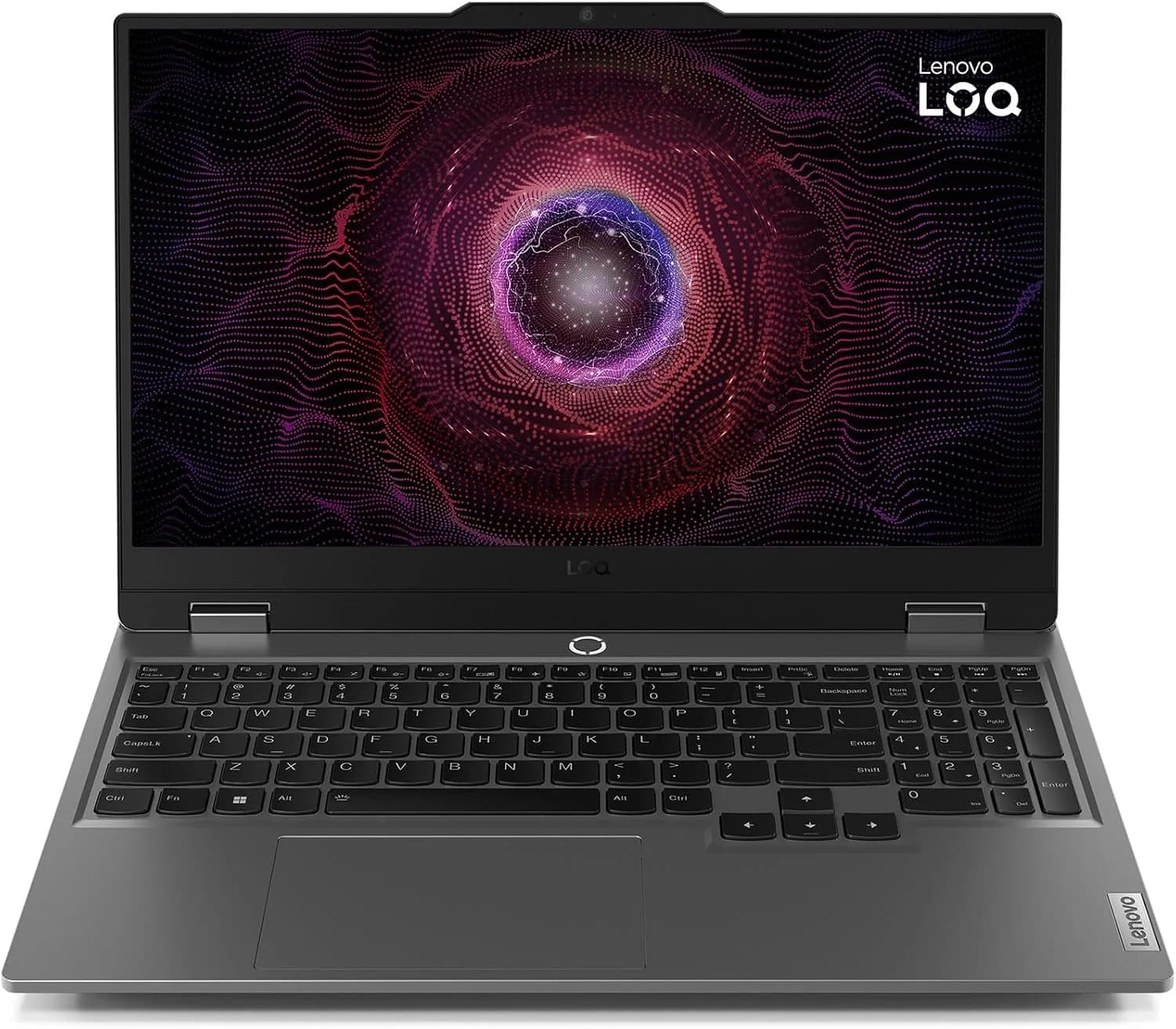
My Amazon recommendation under €1,000: The Lenovo LOQ 15 with RTX 4050, Ryzen 7 7435HS and 16 GB DDR5 — often under €1,000 on Amazon DE. For Premiere Pro and DaVinci at 1080p with proxies*, the realistic Windows entry. Display not color-critical — check cuts at home on monitor.
Concrete recommendation · Amazon DE*
Lenovo LOQ 15 · RTX 4050 · 16 GB
RTX 4050 for 1080p editing in Premiere and DaVinci — with proxies and optional more RAM, the realistic video entry under €1,000.
Vergleich
Lenovo
Lenovo LOQ 15 · Ryzen 7 · RTX 4050 · 16 GB
Bild
Empfehlung
Budget Video
Sensor
AMD Ryzen 7 7435HS · up to 4.5 GHz
ISO-Bereich
NVIDIA RTX 4050 Laptop · 6 GB VRAM
Autofokus
16 GB DDR5 · 512 GB NVMe (RAM upgradeable)
Detail
15.6" FHD IPS 144 Hz · matte
Stärken
+RTX 4050 for Premiere/DaVinci GPU acceleration
+1080p editing with proxies — realistic under €1,000
+RAM upgradeable to 32 GB (2× SODIMM)
+Windows 11 Home · QWERTZ
Schwächen
−Display ~62% sRGB — not for final color grading
−16 GB from factory — upgrade to 32 GB for heavy timelines
Alternatives: Used notebook with RTX 3060 — often similar prices, older generation. Apple: used MacBook Air M1/M2 with Final Cut — for reels and 1080p without Premiere. Both without fixed Amazon link — compare specs.
Workflow tricks instead of more hardware: Enable proxy media (1/4 resolution) in Premiere/DaVinci. Choose codec: H.264 from camera is hard — if possible internal ProRes/DNxHR or at least not All-Intra 4K. Storage: 512 GB SSD + external NVMe for footage — don't fill system SSD. If you mainly do video for social: iPhone/Insta360 + Air/M2 and vlog camera guide for capture often enough; the laptop only needs to cut, not shoot.
If you primarily photograph and only occasionally cut 60-second reels: invest under €1,000 in RAM and display for photo — not an RTX you rarely use. If video is your main job: €1,000 is entry, not destination. Then saving for ProArt/MacBook Pro above pays off — or a fixed PC with monitor.
09
FAQ
Frequently asked questions
How much RAM do I need on a laptop for Lightroom?+
32 GB for regular RAW work with LrC + PS + browser. 16 GB is enough for hobby and small series — not for weddings or large catalogs.
Is 16 GB RAM still enough (2026)?+
As absolute minimum yes — as buying recommendation no. Adobe lists 16 GB as "recommended"; Puget Systems and practice say 32 GB for future-proof workflow including AI denoise.
MacBook or Windows laptop for photographers?+
Adobe-only and Apple ecosystem: MacBook Pro M5 Pro. Windows software (Capture One, DxO), OLED color or cheaper 32 GB setup: ASUS ProArt P16 or comparable creator laptop.
Do I need a dedicated graphics card (RTX)?+
For Lightroom alone: secondary. For Photoshop Neural Filters, AI denoise and Topaz: yes on Windows (RTX 4060+). Apple M5 Pro uses unified GPU — no separate RTX needed.
Is a gaming laptop good for photo editing?+
Compute power often yes — display often no. Legion/Nitro without 100% sRGB are risky for color work. Prefer creator laptops (ProArt, Studio).
Can I upgrade RAM on a laptop later?+
On MacBook and most ultrabooks: no. Some thick Windows workstations yes — check spec sheet before buying. Rule of thumb: 32 GB at purchase.
How much SSD do I need?+
1 TB internal minimum for catalog, cache and current projects. Archive external. Adobe recommends 100 GB free for Photoshop scratch alone.
Is MacBook Pro worth it for photo editing?+
Yes, if you work mobile in Adobe. PugetBench 2026: M5 Pro/Max leading in LrC and PS. More expensive than Windows, but often faster day-to-day and longer lasting.
Which laptop for photo editing under €1,000?+
My Amazon pick: Acer Aspire Go 15 with Ryzen 7, 32 GB RAM and 1 TB SSD (from ~€699). Priority RAM over gaming GPU. Alternative: used MacBook Air M2/M3 with 16 GB for LrC hobby.
Which laptop for video editing under €1,000?+
My Amazon pick: Lenovo LOQ 15 with RTX 4050 and 16 GB — 1080p with proxies in Premiere/DaVinci. RAM upgradeable to 32 GB. 4K multicam new under €1,000: no. Alternative: used M1/M2 MacBook Air with Final Cut.
From my workflow
35mm & 120mm film presets
Portra, Kodak Gold, Velvia, HP5 & more — ready-made XMP presets for Lightroom Classic and mobile.
Affiliate links marked with * — recommendations based on benchmarks, practice and workshops, not commission. Amazon product links use partner ID martinkleinhe-20.
◆ Newsletter
Stay in the loop.
Camera and photography news, honest gear tests and new articles — in your inbox. Infrequent but relevant. No spam, unsubscribe anytime.