
Prepare Employee Photos: The HR & Team Guide

Timeline, briefing email, slot plan, location and consent — so team-photo day does not fail on lateness, the wrong outfit or missing approval. The preparation guide for HR and companies.

Prepare employee photos — team-photo day prep in the office before the portrait shoot
Martin Kleinheinz
Author
Martin Kleinheinz
Photographer · Business & Team Photography · Hannover
Updated
July 30, 2026

When employee photos "don't look good," it's rarely the camera. On team-photo days in Hannover and the surrounding area I see the same pattern: unclear email, no slot plan, wrong outfit, room without power, missing consent. This guide is preparation from photographer practice — and if you want to book the team-photo day, that starts under Business Photography.

I write this as a photographer for business and team photography who shoots teams on site — not as a lawyer and not as a GDPR consultant. With a standing setup (same light, same background) we often land at 3–5 minutes per person in practice. That's not a guaranteed figure and not an industry standard — it only works when everyone knows when they're up, what to wear and where to wait. Executives and catch-up need longer — you plan buffer for that.

What is not in here: outfit deep dive → Clothing for Business Photos. On-set workflow and posing → Employee Portraits & Corporate Photos. DIY without a photographer → How to Create a Profile Picture. Budget → What Does Business Photography Cost. Templates for model release / property release → Model & Property Release.
00
Start

Why preparation decides

Corporate photos rarely fail on light. On site in practice they fail on chaos: three people in the room at once, someone in a hoodie despite the dress code, the next slot already waiting at the door, and consent missing. In the end the series looks inconsistent — and internally people often say "the photographer," even though the lever sat weeks earlier.

My thesis from practice: bad employee photos are often prep problems. The camera is the smallest lever.

Martin Kleinheinz, Photographer Hannover

With a standing setup — same light, same background, same distance — 3–5 minutes is enough for many employees in my experience. That's a practice value, not a promise: prerequisites are arriving on time, a matching outfit, prepared face/hair and consent already in place. If one of those is missing, time doubles quickly — and the rest of the plan tips over.

For HR & marketing
You coordinate briefing, appointments, consents and the room. Sections 01–06 are your roadmap — section 09 to tick off.
For leadership
You want consistent faces on website and LinkedIn — prep decides whether the budget works. Booking and overview: Business Photography.
For employees
You need clear instructions on outfit, time and morning ritual — sections 05 and 07.
01
Roadmap

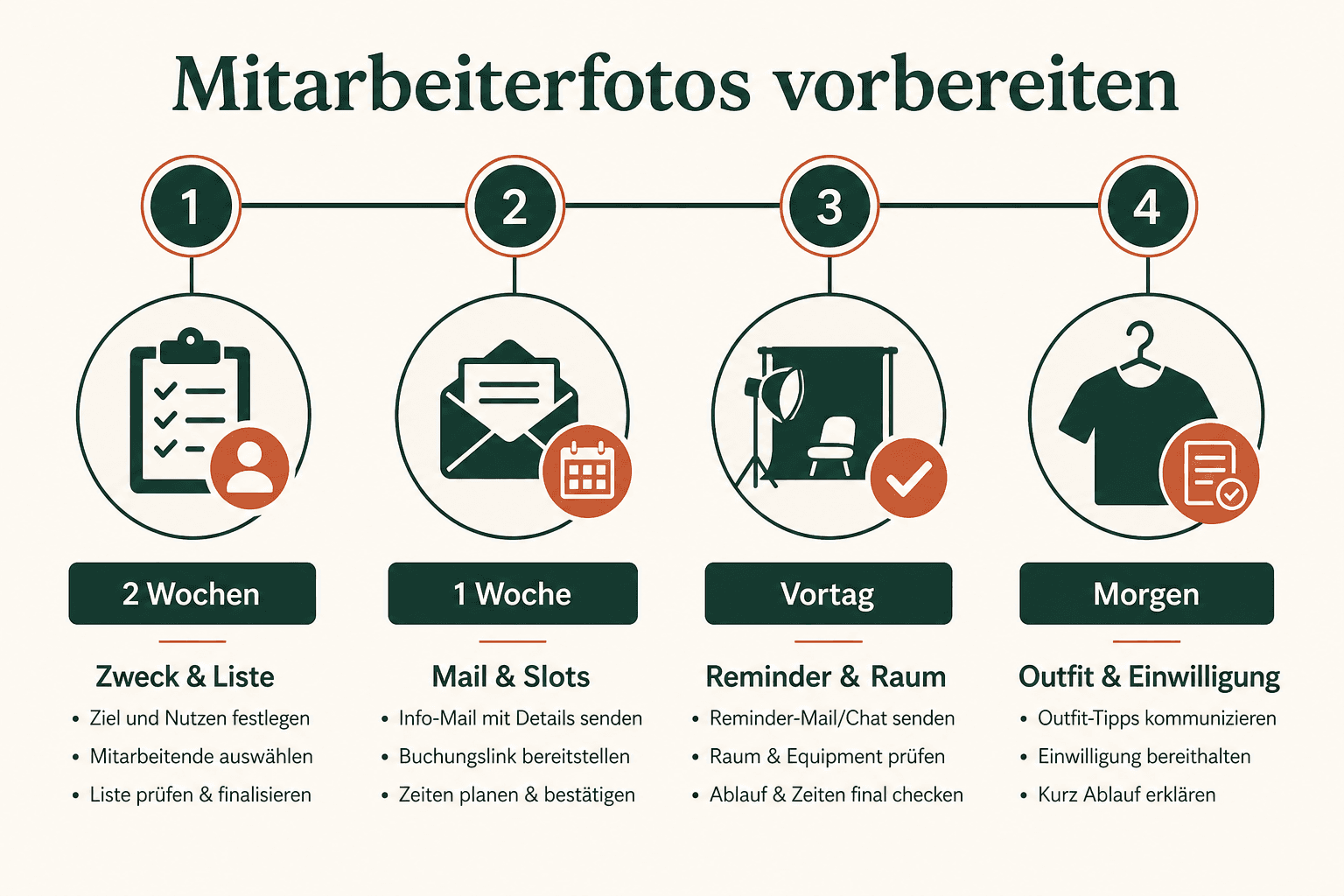
Timeline: 2 weeks to day X

Two weeks is enough for most team-photo days I run — if you don't push the milestones to the last day. The order comes from repeated prep conversations with HR: first purpose and rights, then room and slots, then the email to everyone. For very large workforces or multiple sites, start earlier.

Infographic: timeline to prepare employee photos from two weeks before the shoot to day X
From purpose & consent through briefing and reminder to the catch-all on shoot day
WhenTaskOwner
14–10 days beforeClarify purpose (website, LinkedIn, print, recruiting), headcount, reserve location, brief photographerHR / Marketing
10–7 days beforeFinalize consent text, name internal coordinator, draft slot gridHR + data protection (internal)
5–7 business days beforeBriefing email to all participants (outfit, time, place, what to bring)HR / Coordinator
3–2 days beforeCheck room (power, blackout, waiting area), finalize name list, set catch-all blockCoordinator + Facility
Day beforeReminder email or chat: slot, outfit backup, clean glasses, be on timeCoordinator
Day XSetup buffer, first slot, ongoing control, catch-all at the endCoordinator + photographer

Orientation timeline for a team-photo day — start earlier for large workforces.

02
Legal & process

Consent & usage (not legal advice)

Rights belong before the email to everyone. Without clear consent and usage agreements it gets expensive later: images online, person objects, marketing has to scramble. I experience this as a process topic on the client side — not as legal counsel. Clarify before the shoot: what the photos may be used for, who stores them, and how withdrawal works.

  • Collect consent in advance — don't have people sign between two slots (stress, errors, unclear purposes)
  • Name purposes specifically (e.g. company website, social/LinkedIn, print/recruiting) instead of "anything possible" — have wording legally reviewed
  • Communicate withdrawal and an internal contact — keep a process ready, don't invent it later
  • Model release / release templates as a starting point, not a finished solution: Model & Property Release — adapt to your situation and have them reviewed
  • Clarify usage rights contractually with the photographer (channels, duration) — see also What Does Business Photography Cost

As employer and client you carry responsibility for handling the portraits in a data-protection-compliant way. I deliver the images and the contractually agreed usage rights — internal GDPR documentation, employee information and withdrawal processes stay with you. That's division of labor, not shifting responsibility onto the camera.

03
Room

Prepare the location

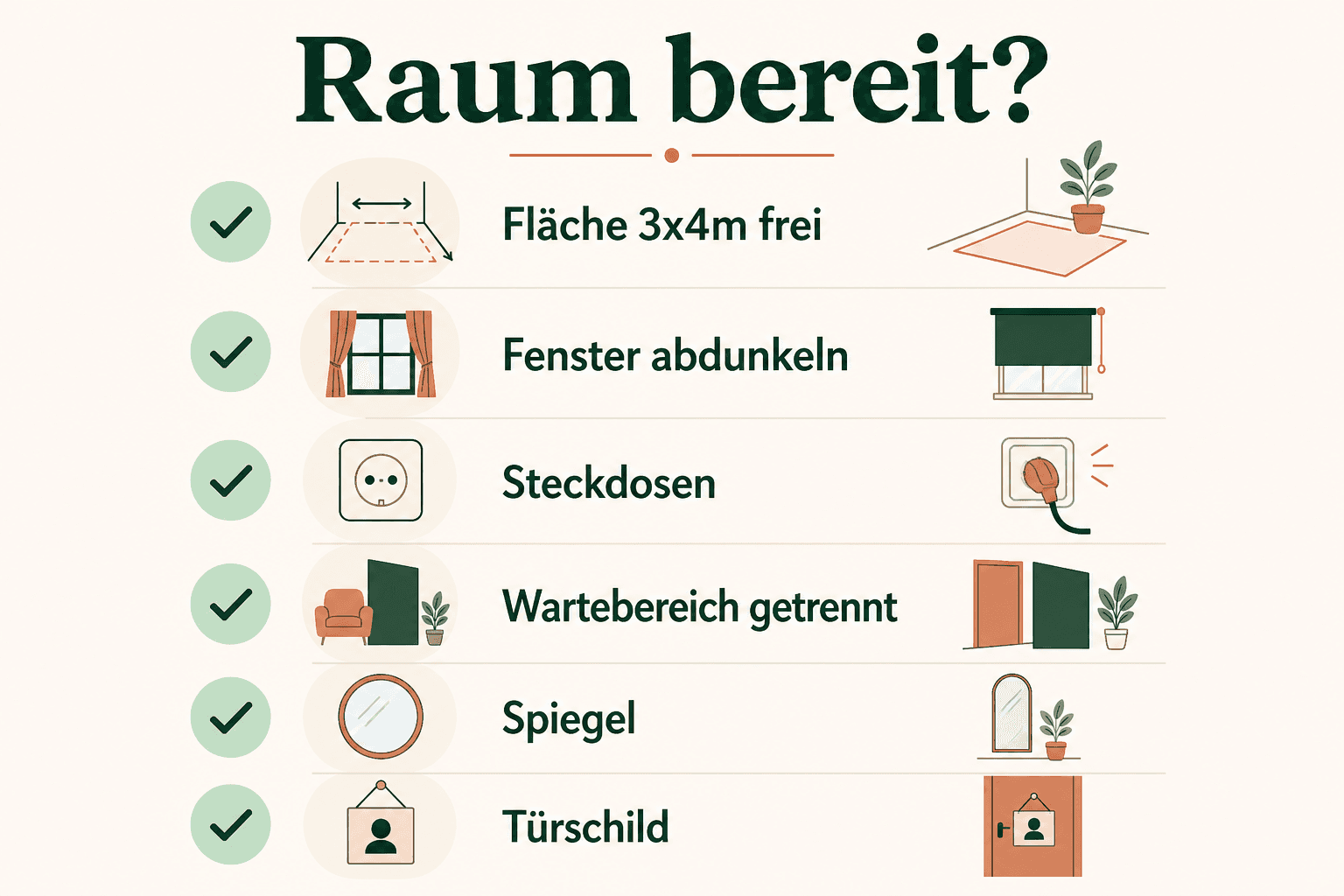
The room doesn't have to be beautiful — it has to be functional. For a mobile portrait setup, roughly about 2.5 × 3 m to 3 × 4 m is often enough in practice, plus space for light and background — rough orientation, not a floor plan. Black out windows (or control them), power within reach, waiting area separate from the set. The pretty glass facade with backlight looks good on a walkthrough and makes series inconsistent.

Infographic: location checklist for employee photos — room size, blackout, power, separate waiting area
A small, dark, quiet room beats the pretty glass facade with backlight
  • Clear roughly 2.5×3 to 3×4 m of floor space (furniture out or against the wall)
  • Windows: blinds/curtains — mixed light and hard sun make series inconsistent
  • Power: at least 1–2 outlets near the setup (clarify extension cords)
  • Background wall or space for a seamless / fabric backdrop
  • Waiting area outside the camera's field of view — doors closed, noise down
  • Mirror or window for a last outfit/hair check before the slot
  • AC/heating: extreme heat = shine and sweat on the forehead

More on location options (studio, office, plain background) and the setup on the day: Employee Portraits & Corporate Photos.

04
Organization

Schedule: slots, buffers & no-shows

Without a slot plan everyone comes "sometime in the morning" — and you get a queue, empty camera time and stressed faces. Plan fixed slots, a setup buffer at the start and a catch-all block at the end.

Standard slot
Practice value with a standing setup: often 3–5 min in front of the camera — not a guaranteed figure. In the calendar, plan 8–10 min instead (handoff, short briefing, lateness buffer).
Leadership / exec
Allow longer: more looks, more alignment, often higher expectations. Don't squeeze them into the same short beat — that saves more time in the end than it costs.
Catch-all
At the end often 30–60 minutes for no-shows, lateness and "just one more" — orientation, adjust by team size. Without this block the plan dies on reality.
Order
Early: people with fixed meetings after. Late: flexible roles. Executives often in quieter windows — not in the middle of chaos.

No-shows happen — even in well-organized companies. So from experience: reminder the day before, one person who follows up (coordinator), and clear communication that missed slots move to the catch-all or a catch-up appointment — not spontaneously into the middle of the series. Otherwise consistency of light and posture breaks.

05
Clothing

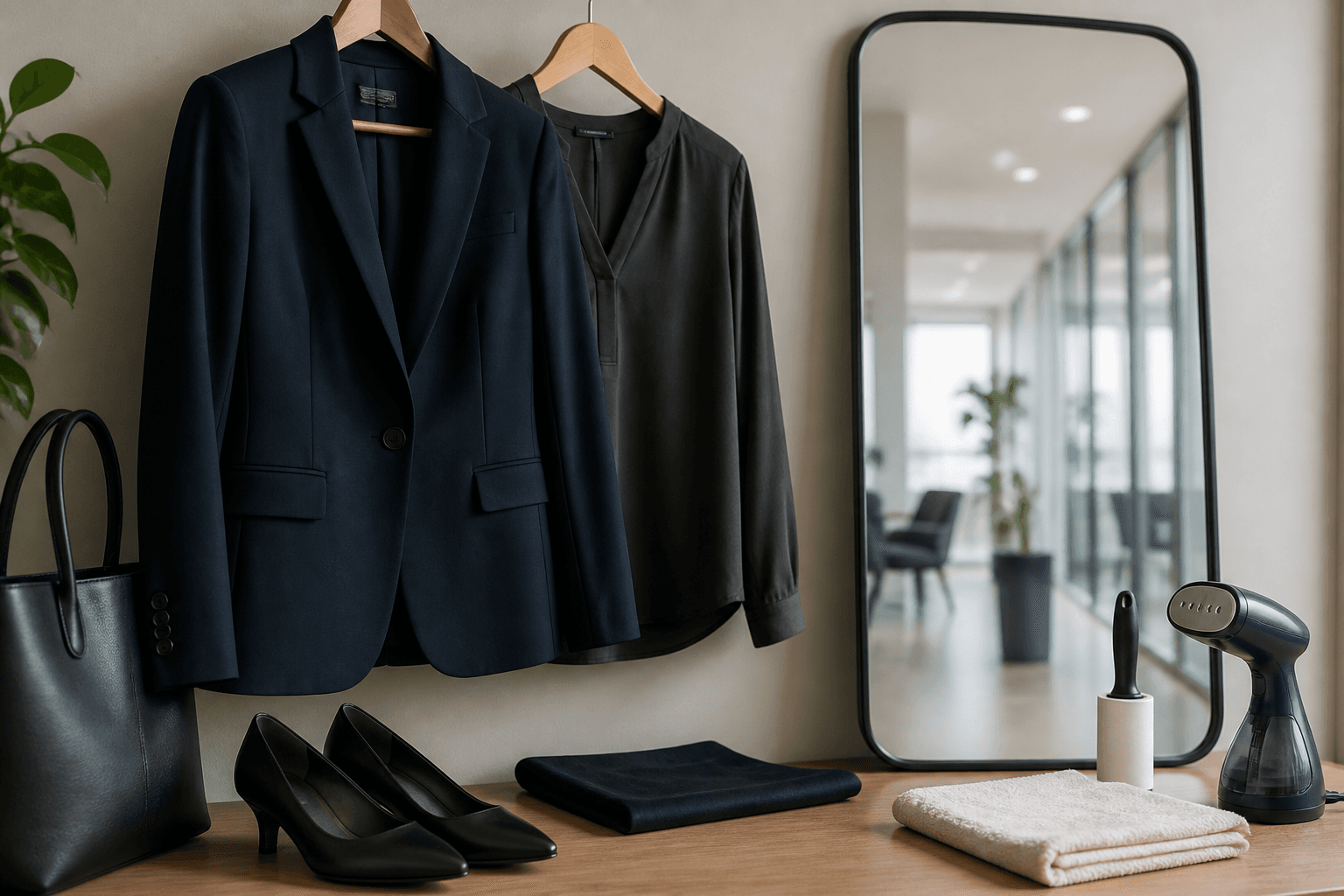
Outfit in 90 seconds

For the prep email you don't need a fashion essay — you need a rule that's clear in 90 seconds. Depth on colors, moiré, industries and team style: Clothing for Business Photos. Workflow and posing in parallel: Employee Portraits & Corporate Photos.

  • Solid tops in navy, gray, black, white or beige — no large logos, no neon
  • Small patterns OK if they look calm from a distance; large prints and glitter disrupt the series
  • Neckline: neither extremely deep nor buttoned up to the chin — natural and on-brand
  • Bring a backup outfit (second top) — saves stains and "this doesn't suit me after all"
  • Jewelry reduced; avoid shiny fabrics and strong satin looks (reflections in the light)
06
Communication

Briefing email for HR: content + copy-paste skeleton

Now you pull the building blocks together. The email decides whether everyone arrives prepared on day X — I often notice that at the first slot: who was briefed arrives calm; who only got a calendar invite improvises. Send it 5–7 business days ahead — and a short reminder the day before. Too early gets forgotten; too late leaves no time for outfit or a haircut.

Infographic: structure of a briefing email for employee photos — what, when, outfit, consent
Every briefing email needs purpose, slot, place, outfit rule and a note on consent

What belongs in every email

  • Purpose: what the photos will be used for (website, LinkedIn, print, recruiting)
  • Date, own slot (time) and meeting point / room number
  • Duration expectation: often only a few minutes in front of the camera — plus waiting
  • Outfit rule in one paragraph (plus backup outfit) — see section 05
  • What to bring / prepare: cleaned glasses, matte makeup if desired, consent if still open
  • On-site contact (name + short dial / chat)
  • Note: lateness = catch-all or new appointment

Copy-paste skeleton

Subject: Employee photos on [DATE] — your slot [TIME] Hi [NAME], on [DATE] we're photographing consistent business portraits for [PURPOSE, e.g. website & LinkedIn]. Your appointment: [TIME], meeting point: [ROOM / RECEPTION]. Plan about [5–10] minutes including a short wait. Outfit: [short rule, e.g. solid tops in navy/gray/white, no large logos, no neon]. Please bring a backup top. Clean your glasses beforehand; makeup more matte than shiny. Consent: Please complete [LINK / form / signature] by [DATE] if still open. On-site contact: [NAME, CONTACT]. If you can't make it, please let us know by [TIME DAY BEFORE] — we have a catch-all block at the end. Thanks & [HR / Coordinator]

Template — adapt and send
07
For the team

Employees: day before & morning

Small rituals before the slot make the difference between "done" and "we're retouching shine and flyaways all day" — I notice that on set immediately. Send these points with the reminder — short and concrete.

Haircut / beard
Haircut ideally 3–7 days before — not the morning of the shoot (too fresh, too unfamiliar). Groom the beard or leave it deliberately, but don't "just let it grow wild quickly."
Skin & makeup
Matte instead of shiny. Strong highlighter and greasy creams reflect under flash. Powder or blotting paper on set help — prep at home helps more.
Glasses
Clean them. Scratches and fingerprints show immediately. If you wear contacts and feel more confident that way: test on shoot day, don't experiment.
Sleep & stress
No marathon evening the night before. A calm arrival 5 minutes before the slot beats rushing out of a meeting.
Backup
Second top in the closet or bag. Stains and "this feels wrong" are everyday.
08
Traps

Mistakes that ruin series

Briefly the prep traps that reliably destroy a series — and none of them is "bad luck with the camera." The list comes from recurring patterns on team-photo days, not theory:

No briefing / no dress code
Everyone arrives dressed differently — retouching can't save that.
No slot plan
Queue, sweat, wrinkled shirts, annoyed expressions.
Wrong room
Backlight, no power, constant walk-ins — setup drifts, images go inconsistent.
Consent "later"
Images are ready, usage is blocked. Approval before the first click — clarify legal details internally (no legal advice here).
No coordinator / execs in the short beat
Without an on-site contact the photographer juggles list and light. Leadership often needs more time than the 3–5-minute practice value — plan for that.

When day X runs calmly, it rarely was luck — it was the email from a week ago.

Martin Kleinheinz, Business Photography Hannover
09
To tick off

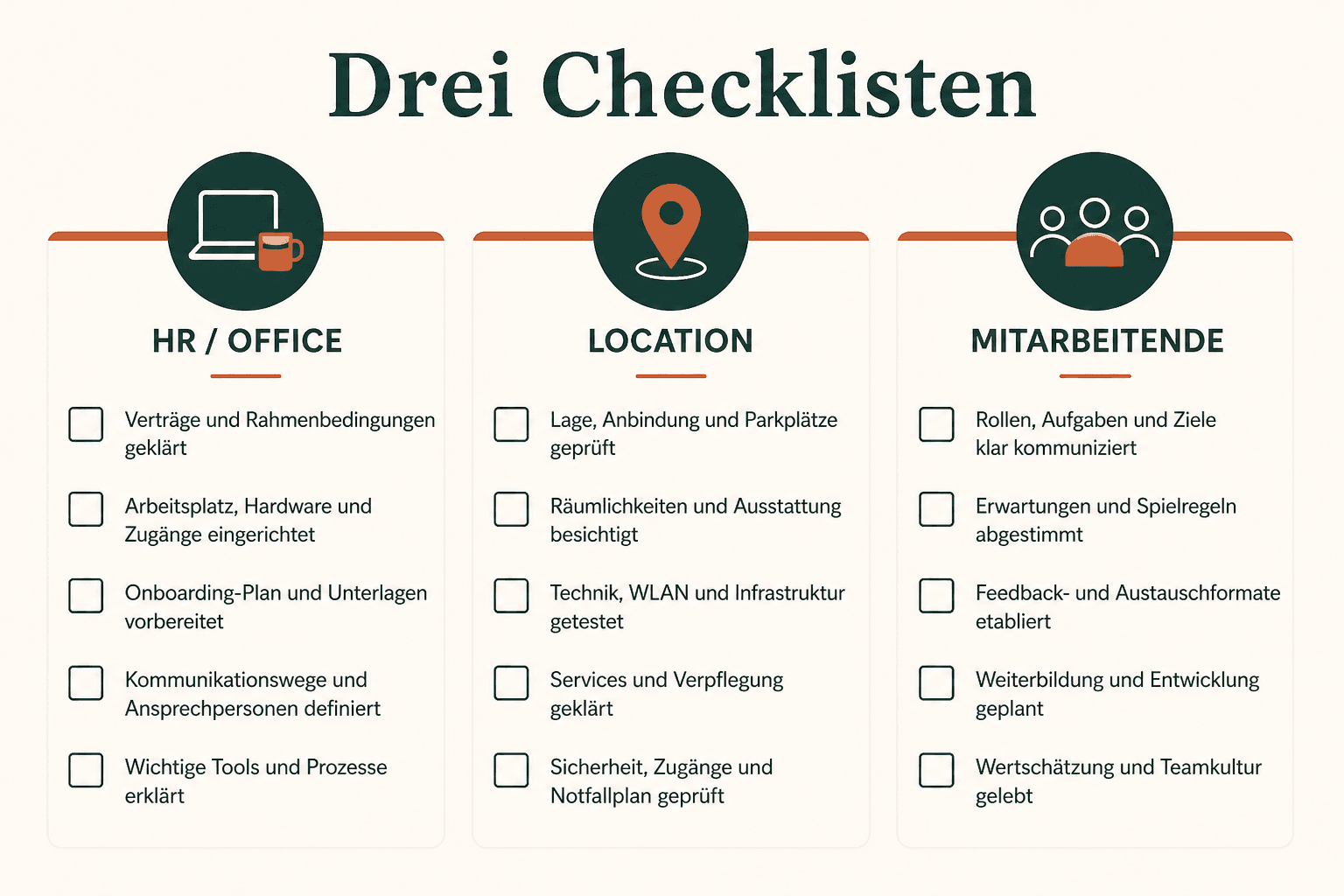
Checklists: HR / location / employees

Three lists, one goal: on day X only shoot — don't improvise. Print them or copy them into your ticket.

Infographic: three checklists for employee photos — HR, location and employees
HR orchestrates, facility secures the room, the team arrives prepared

HR / coordinator — before the day

  • ☐ Purpose & channels defined (website, LinkedIn, print, recruiting)
  • ☐ Name list final (incl. executives / priorities)
  • ☐ Slot plan + catch-all (30–60 min) + setup buffer
  • ☐ Briefing email sent 5–7 business days ahead
  • ☐ Day-before reminder planned / sent
  • ☐ Consents collected / open cases marked
  • ☐ On-site contact named and reachable
  • ☐ Photographer briefed (mood, background, delivery scope)

Location / facility — 3–2 days before

  • ☐ Room reserved (~2.5×3–3×4 m usable)
  • ☐ Windows can be blacked out
  • ☐ Power / extension cords clarified
  • ☐ Waiting area separate from the set
  • ☐ Access / key / neighbor info
  • ☐ Mirror or window for last look check

Employees — day before & morning

  • ☐ Slot time in the calendar
  • ☐ Outfit + backup chosen (dress code from the email)
  • ☐ Haircut done 3–7 days before (if planned)
  • ☐ Glasses cleaned, makeup rather matte
  • ☐ Consent done
  • ☐ 5 min early at the meeting point
10
Close

Takeaway: prep makes the 3–5 minutes possible

Employee photos are a system appointment, not a spontaneous hallway phone snap. When briefing, slots, room and consent are in place, the short 3–5 minute slot with a standing setup is often enough in practice — and the series looks consistent. Without the prep, no camera saves the day. That's the experience behind this guide, not marketing speak.

11
FAQ

FAQ about preparation

When should the briefing email go out?
Typically 5–7 business days before the shoot — plus a short reminder the day before. Earlier gets forgotten; later leaves no time for outfit or a haircut.
How long does a slot take per person?
With a standing setup often 3–5 minutes in front of the camera — a practice value from my work as a business photographer, not a guaranteed figure. In the calendar, plan 8–10 minutes instead. Executives and catch-up need longer — plan buffer and catch-all.
What kind of room do we need?
Often about 2.5×3 to 3×4 m (orientation), blackout-capable windows, power and a waiting area separate from the set. Pretty glass facades with backlight are usually the worse choice — functional beats representative.
What's the difference from "Employee Portraits & Corporate Photos"?
This article is prep only (HR, timeline, briefing, slots, location, consent). Outfit deep dive: Clothing for Business Photos. On-set workflow, posing and setup: Employee Portraits & Corporate Photos.
Can we shoot the photos ourselves?
For individual DIY profile pictures: yes — see How to Create a Profile Picture. For consistent team series with website standards, a pro setup and clear prep usually pays off. Honest boundary: DIY and team-photo day solve different problems.
What about GDPR and model release?
Not legal advice. Consent in advance, purposes specific, withdrawal process clarified internally — and have wording reviewed by data protection/legal. Templates only as a starting point under Model & Property Release; they don't replace an individual review.
What does a team-photo day cost?
Orientation and ranges are under What Does Business Photography Cost. Prep doesn't change the list price — it decides whether the budget turns into good, usable images.
Do you offer employee photos in Hannover yourself?
Yes. I'm a photographer in Hannover and shoot teams and workforces in Hannover and the surrounding area (business & team photography). Bring the prep checklist — details and inquiry under Business Photography. Openly: I earn from bookings; the prep guide remains the roadmap I need before every team-photo day.
Affiliate links marked with * — Amazon product links use partner ID martinkleinheinz-21. I earn a small commission if you buy through these links; there's no extra cost to you. I also offer [business photography in Hannover](/en/business-photography/) myself — openly disclosed, not hidden. The recommendations are based on my practice as a photographer; no brand sponsored this article. Time figures (e.g. 3–5 min/person) are experience values from standing setups, not a guarantee. Sections on consent, GDPR and usage are **not legal advice** and do not replace a data protection officer or lawyers — content review status: July 2026.
Next step

Team-photo day prepared — and shot professionally?

I'm a photographer in Hannover for business and team photography: standing setup, clear slots, consistent series for website and LinkedIn. Write me headcount, location and preferred date — I'll send you the prep roadmap with it. Openly: I earn from the booking; the guide above stays the same one I need before the day.

Keep reading

From the journal.

Fotograf, Martin Fernando Mera Kleinheinz · Franz-Bork-Straße 21, 30163 Hannover · 0179 4085297