
LinkedIn Profile Photo: What Actually Works in 2026

Circle crop, banner, expression and the checklist — so your photo on LinkedIn builds trust, not just looks "somehow professional".

LinkedIn profile photo — professional business headshot for LinkedIn 2026
Martin Kleinheinz
Author
Martin Kleinheinz
Business photographer · Hannover · PicVibe co-developer
Updated
July 30, 2026

Your LinkedIn profile photo is not jewelry — it's the first trust check before anyone reads your title, posts or website. As a business photographer in Hannover I see the same pattern again and again: good people, but a crop that cuts the shoulders in the circle, a banner with text in the dead zone, or an expression that looks "stiff" instead of "approachable". If you want a professional business headshot, that starts at Business Photography.

This article is the LinkedIn deep-dive from my work with solo headshots and team series: specs, circle crop, banner, expression, industry codes, mistakes, DIY vs. pro, HR briefing and AI. Window-light step sequence, smartphone workflow and multi-platform stay in How to Create a Profile Picture — here it's about what specifically counts on LinkedIn in 2026.

Outfit: Clothing for Business Photos. Team prep: Prepare Employee Photos. Budget: What Does Business Photography Cost. Test how others see you: PicVibe — openly: co-developed by me.
00
Start

Why LinkedIn photo 2026 is more than a portrait

LinkedIn in 2026 is no longer just a job board. It's a sales channel, recruiting surface, thought leadership and often the first Google search for your name. The profile photo decides in fractions of a second whether someone clicks further — or keeps scrolling. A "somehow professional" selfie is often technically fine. It rarely builds the trust you need for inquiries, introductions and hiring.

My rule of thumb from headshot and team shoots: the LinkedIn image has to let people recognize you and at the same time say: you can work with this person. Not high-gloss magazine, not vacation snapshot.

Martin Kleinheinz, business photographer Hannover

LinkedIn has communicated for years: profiles with a photo get significantly more attention than profiles without. Often cited: up to 21× more profile views — that's the comparison with image vs. without image (LinkedIn's own figures / marketing communication), not "pro studio vs. smartphone". In parallel, older or differently rounded figures circulate — about around 14×. Both orders of magnitude are orientation, not a conversion guarantee and not proof of a quality tier. The quality question comes after: crop, expression, currency.

For solo & freelancers
Specs, circle crop and expression first — sections 01–04, then checklist in 11.
For HR & marketing
Consistent team headshots on LinkedIn — section 09 plus prep cluster.
For leadership & sales
Trust beats pose. Booking and setup: Business Photography — openly: my offer in Hannover.
01
Tech

What LinkedIn officially wants

LinkedIn accepts profile photos in a wide range — and still shows them tiny. So what counts is not only "upload allowed", but "still recognizable as a thumbnail and in the circle".

ParameterOfficial / documented figurePractice recommendation 2026
File formatJPG or PNGJPG for photos; PNG only needed for hard graphics
File sizemax. ~8 MBUnder 2 MB is usually enough — quality stays, upload is faster
Resolution400–7680 px (side length)Square 800–1000 px as sweet spot for sharpness and file size
Aspect ratioSquare recommendedExport 1:1 — LinkedIn crops to circle
Face in frameclearly recognizableFace about 60 % of image height; eyes in upper third

Official range vs. practice — LinkedIn accepts a lot; the circle crop forgives little.

Under 400 px it gets soft and pixelated. Over 1000–2000 px rarely brings visible gain in the feed — only larger files. For Retina displays and zoom on the profile, the 800–1000 px square export in good JPEG quality (quality ~85–90) is enough.

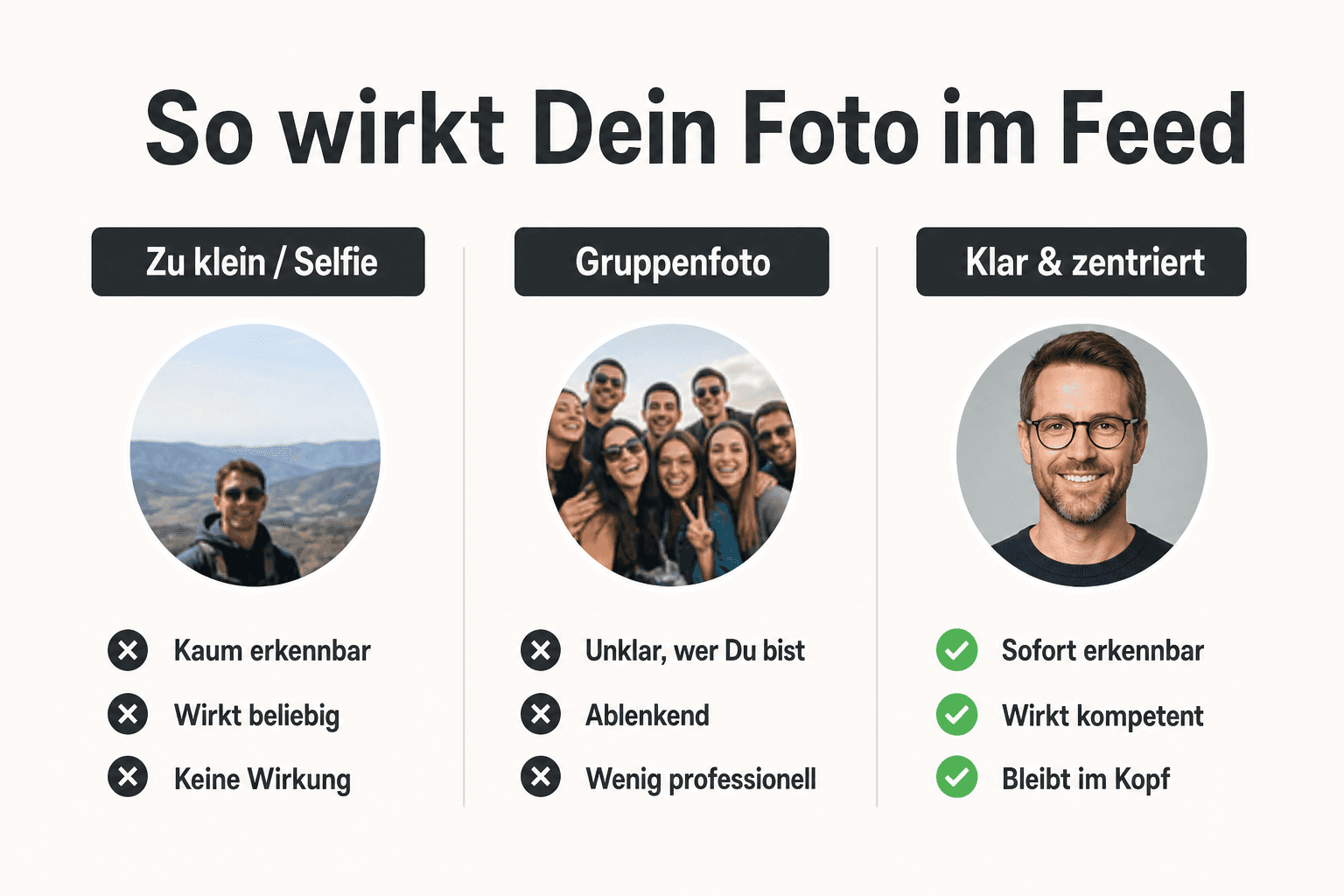
Comparison: LinkedIn profile photo as large portrait vs. tiny thumbnail and circle crop
What looks large in the studio still has to work as thumbnail and circle — recognizability first
02
Crop

The circle crop

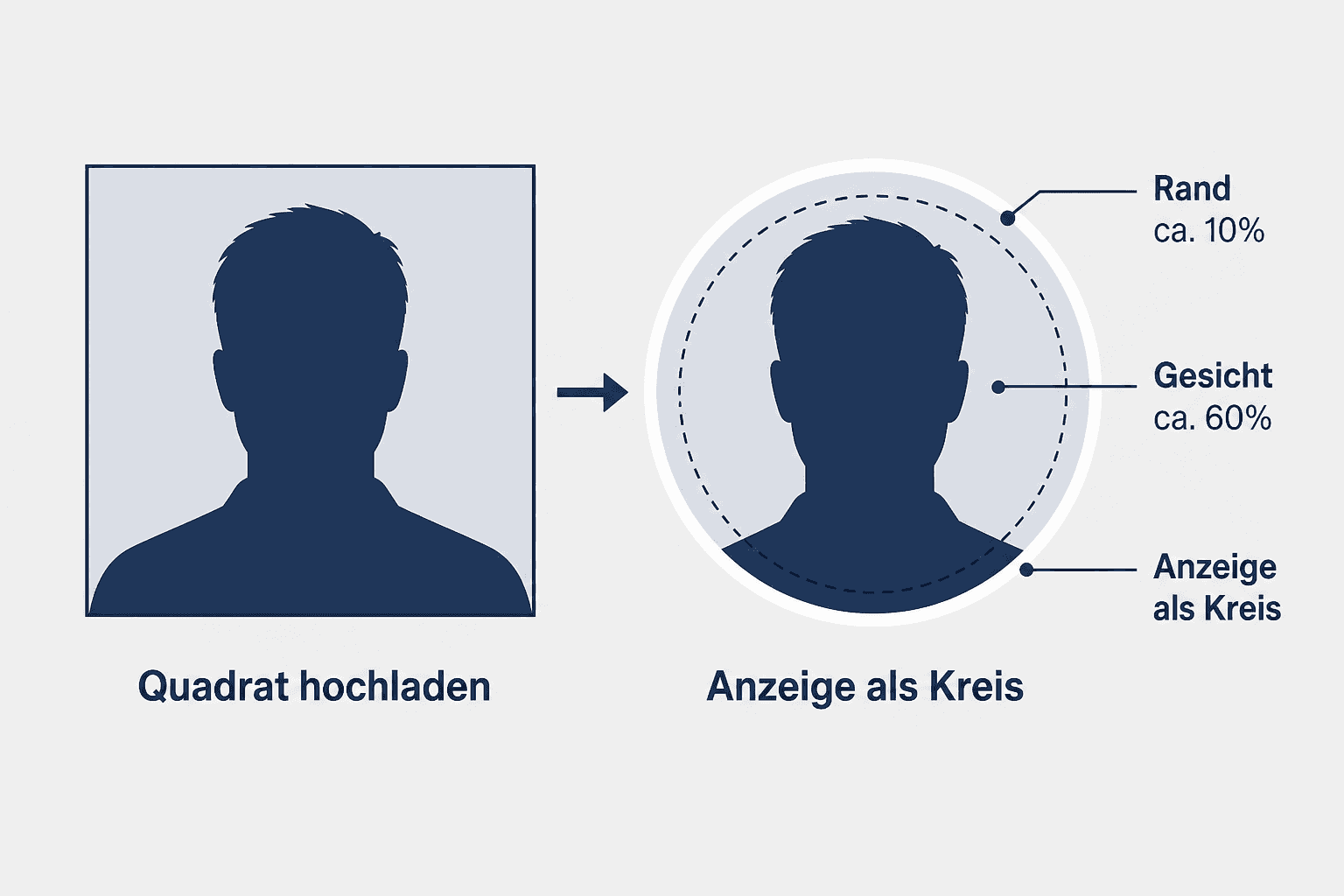
LinkedIn shows your profile photo as a circle. What you see as a square in the upload window gets cut at the corners. Shoulders, hair and logos at the edge disappear — and often exactly the parts that were supposed to signal "profession".

Infographic: LinkedIn circle crop — face about 60 percent, 10 percent edge, safe zone
Safe zone in the circle: face dominant, edge buffer ~10 %, nothing important in the corners
Face ~60 %
Head and neck fill most of the circle. Too far away: you look lost. Too close: forehead and chin get cropped.
~10 % edge buffer
Leave air around the head. The circle eats the edge — without a buffer, hair and ears look cut off.
Eyes up
Eyes typically sit in the upper third of the circle. That leaves room for chin and shoulder line — without the head "sliding down".
No text at the edge
Company name, certificate badge or hashtag in the image? In the circle often gone or unreadable. Text belongs in headline and About — not in the photo.

Practically: export a square master (e.g. 1000×1000), center the face, check the circle preview in LinkedIn before saving. Many tools (including Lightroom/phone) have a circle overlay — use it.

03
Layout

Profile photo vs. banner

Profile photo and banner are a duo. The photo says "who you are", the banner says "where you belong" — industry, brand, location, offer. Anyone who only optimizes the photo and leaves the banner empty or over-texted wastes half the surface.

ElementRecommended sizeJob
Profile photoSquare 800–1000 px → circleRecognizability, trust, competence
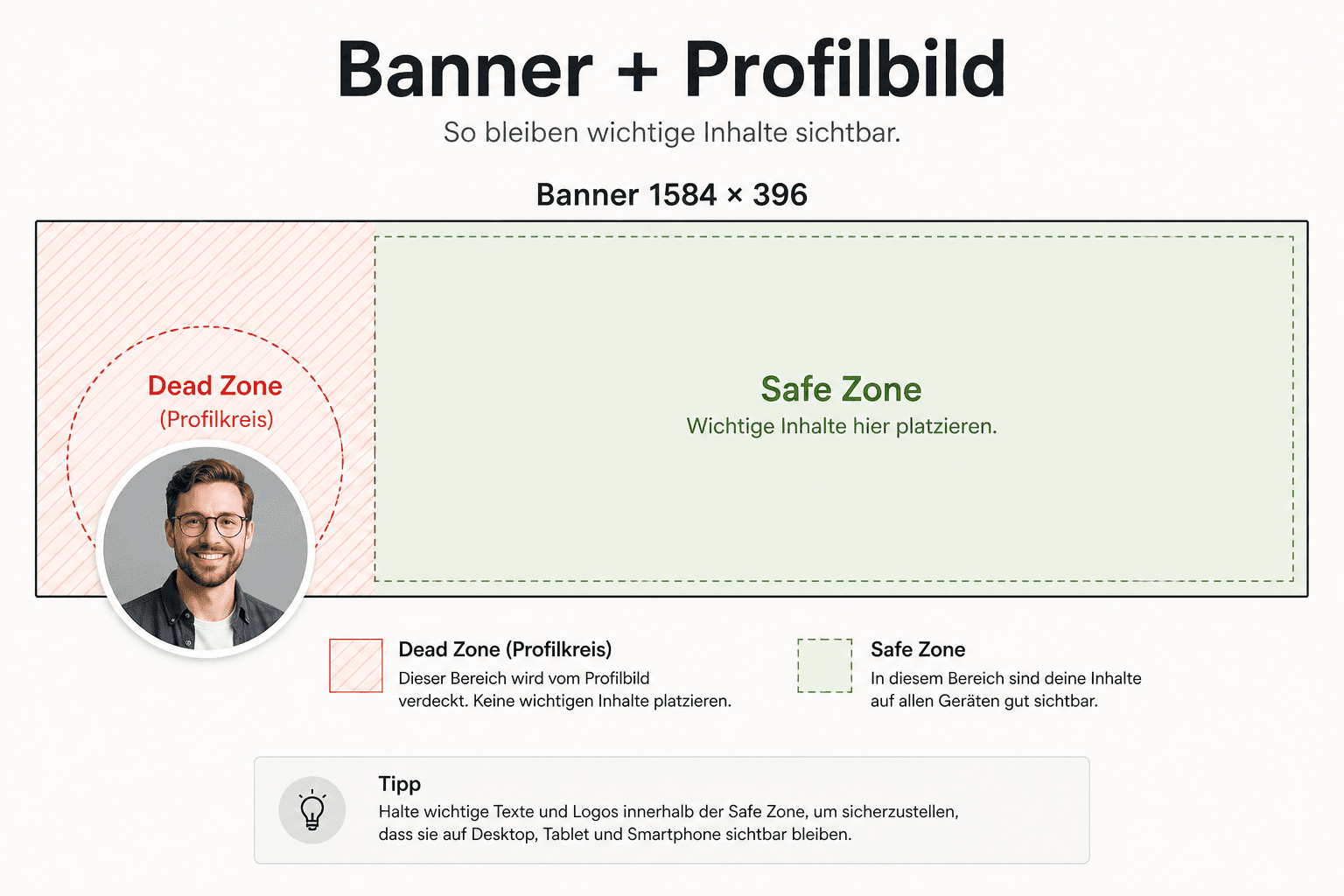
Banner / background1584 × 396 px (classic desktop recommendation)Brand, context, visual calm — not a second portrait

Profile photo = face. Banner = stage. Don't fill both with the same selfie.

LinkedIn banner 1584×396 with safe zone and dead zone bottom-left from profile photo overlay
Banner 1584×396: keep important content out of the dead zone bottom-left — the profile photo sits there

Dead zone bottom-left: On desktop the circular profile photo overlays the banner. Anything you place there — logo, claim, phone number — gets covered or unreadable. Keep the critical zone clear; put text and graphics more to the right and top. On mobile the layout shifts — still: no important info in the bottom-left corner.

  • Banner: calm photo (workspace, city, abstract brand surface) or subtle branding
  • No second face next to the profile photo — looks doubled and restless
  • Less text: one claim or location is enough; paragraphs belong in About
  • Colors lean on brand and outfit in the profile photo — not neon against navy
04
Impact

Expression & trust

Technique without expression is just a file. On LinkedIn people look for signals: approachability, competence, seriousness. On set I often notice: the camera doesn't matter — the micro-expression decides whether the image looks "approachable" or "passport-stiff".

Orientation from PhotoFeeler evaluations (crowdsourcing on profile photos — not my own survey, no invented percentages): a smile with visible teeth typically raises perceived likability. A very loud / laughing smile can meanwhile push perceived competence down — depending on context and industry. That's study direction, not a law of nature: test two variants (subtle teeth smile vs. calm, friendly closed mouth) and choose by target role.

Eyes first
A real smile reaches the eyes. Only the mouth lifted often looks posed. Briefly think of something pleasant before the shutter clicks — the same cue I use in the studio.
Look into the lens
On LinkedIn direct eye contact is the default. A side glance works better on dating — here it looks more evasive.
Shoulders relaxed
Raised shoulders and a forward neck signal tension. One level "client meeting", not "passport stiffness".
Validate instead of guessing
Friends are too nice. Anonymous feedback — e.g. via PicVibe — shows which image lands with strangers. Openly: I co-developed PicVibe; the recommendation is labeled, not mandatory.
05
Setup short

Background & light (short)

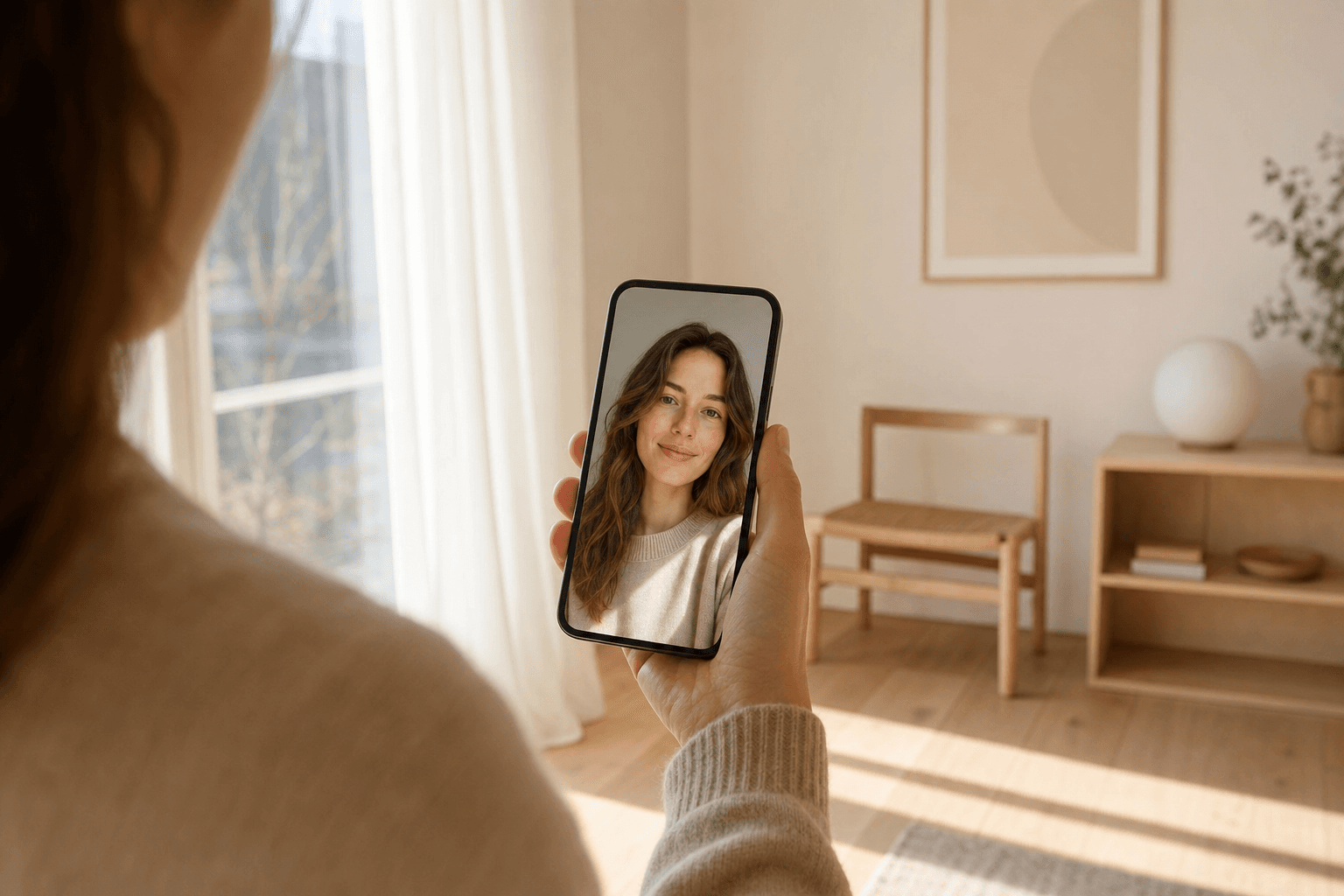
For LinkedIn a short check is enough — not a second DIY handbook. What counts in the circle and as a thumbnail: face bright enough, background calm enough, no chaos behind the head. Soft light from front/side beats hard overhead; the rest of the setup step sequence is in How to Create a Profile Picture.

  • Background: solid, subtle office bokeh or studio — nothing that competes with the face in the circle
  • Contrast: face clearly separated from the background (thumbnail recognizability)
  • No text, logos or people behind you — in the circle they look like image noise
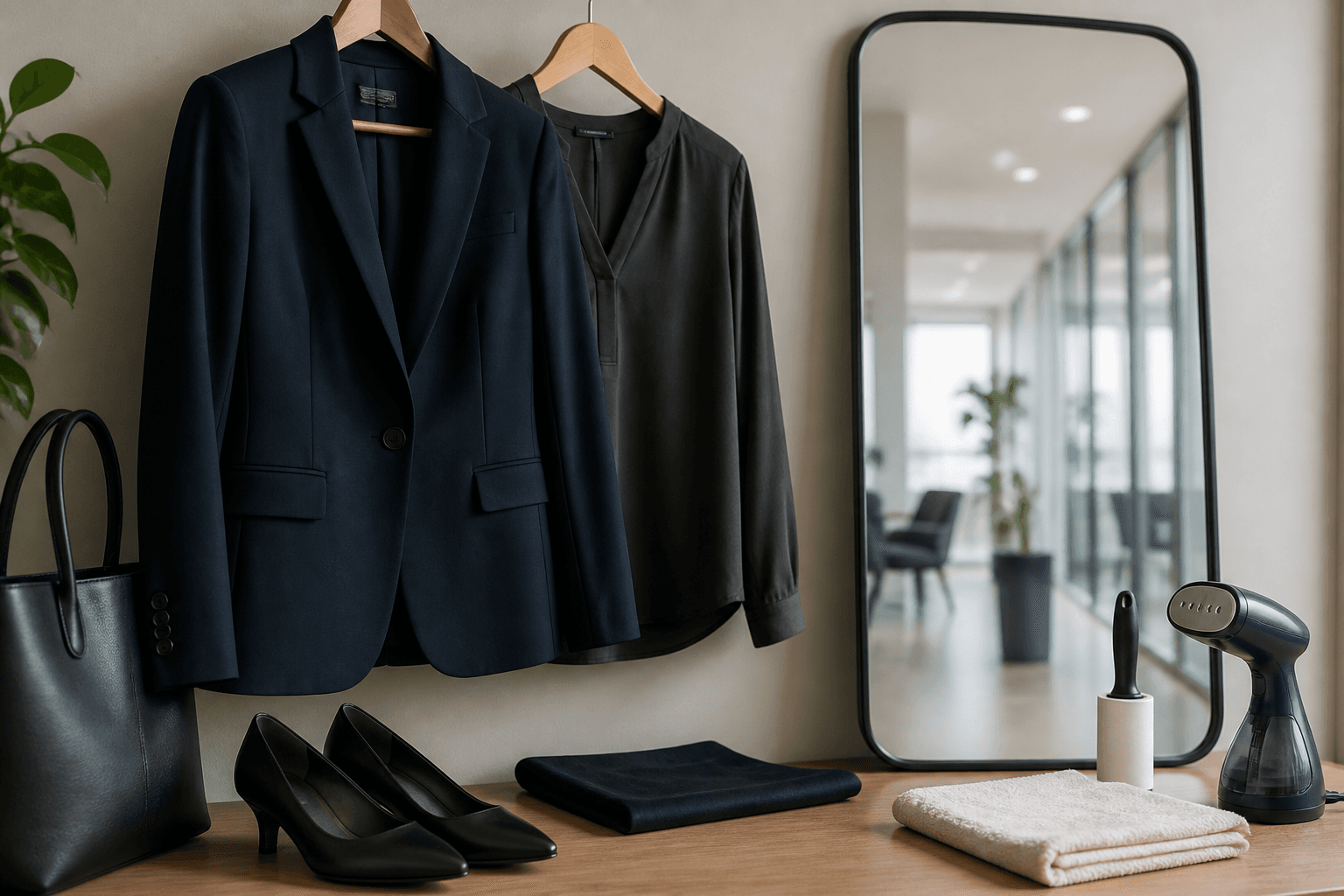
  • Outfit: matte, calm color — deep-dive: Clothing for Business Photos

For team days, prep in parallel: Prepare Employee Photos.

06
Germany

Industry codes DE

Specs and crop are universal — expression and outfit are not. In Germany LinkedIn often sits between two cultures: the classic application photo (very formal, light background, almost passport logic) and the international LinkedIn style (warmer, brand-nearer, a bit more personality). You don't have to upload the stiffest application photo — but also not the festival selfie.

ContextTendency DELinkedIn recommendation
Application photo (classic)Very formal, light, little smileToo stiff for many roles — LinkedIn tolerates more warmth
Law / tax / medicineSeriousness firstCalm smile, classic outfit, calm background
Consulting / financeCompetence + approachabilityTeeth smile ok; blazer/navy often default
Tech / startupCasual, but not randomSmart casual, clear recognizability, banner with brand
Trades / industryReal before high glossWork-near clothing ok — face and light still professional
Creative / agencyMore personalityStyle allowed — still check circle crop and thumbnail

Germany: LinkedIn may be warmer than the classic application photo — without becoming arbitrary.

Rule of thumb: one level above your everyday, fitting the industry. What you'd wear to an important client meeting is usually the sweet spot — see also the industry matrix in Clothing for Business Photos. For lawyers, notaries and tax advisors: Photographer for Law Firms.

07
Mistakes

Most common LinkedIn mistakes

Once specs, crop, banner and industry code are clear, most images still fail on the same patterns. This list comes from briefings, audits and shoots in Hannover — grouped by what LinkedIn visibly punishes.

Crop & thumbnail
No photo / default silhouette; circle eats the head (too little edge buffer); text/logo in the profile photo; sunglasses or strong shadow on the eyes.
Banner & layout
Banner text in the dead zone bottom-left; second face in the banner; paragraphs instead of one claim.
Context & trust
Vacation, party, group photo; bathroom mirror selfie; outdated photo (10 years younger); over-retouch / filter skin; different face than on website/team page.
08
Decision

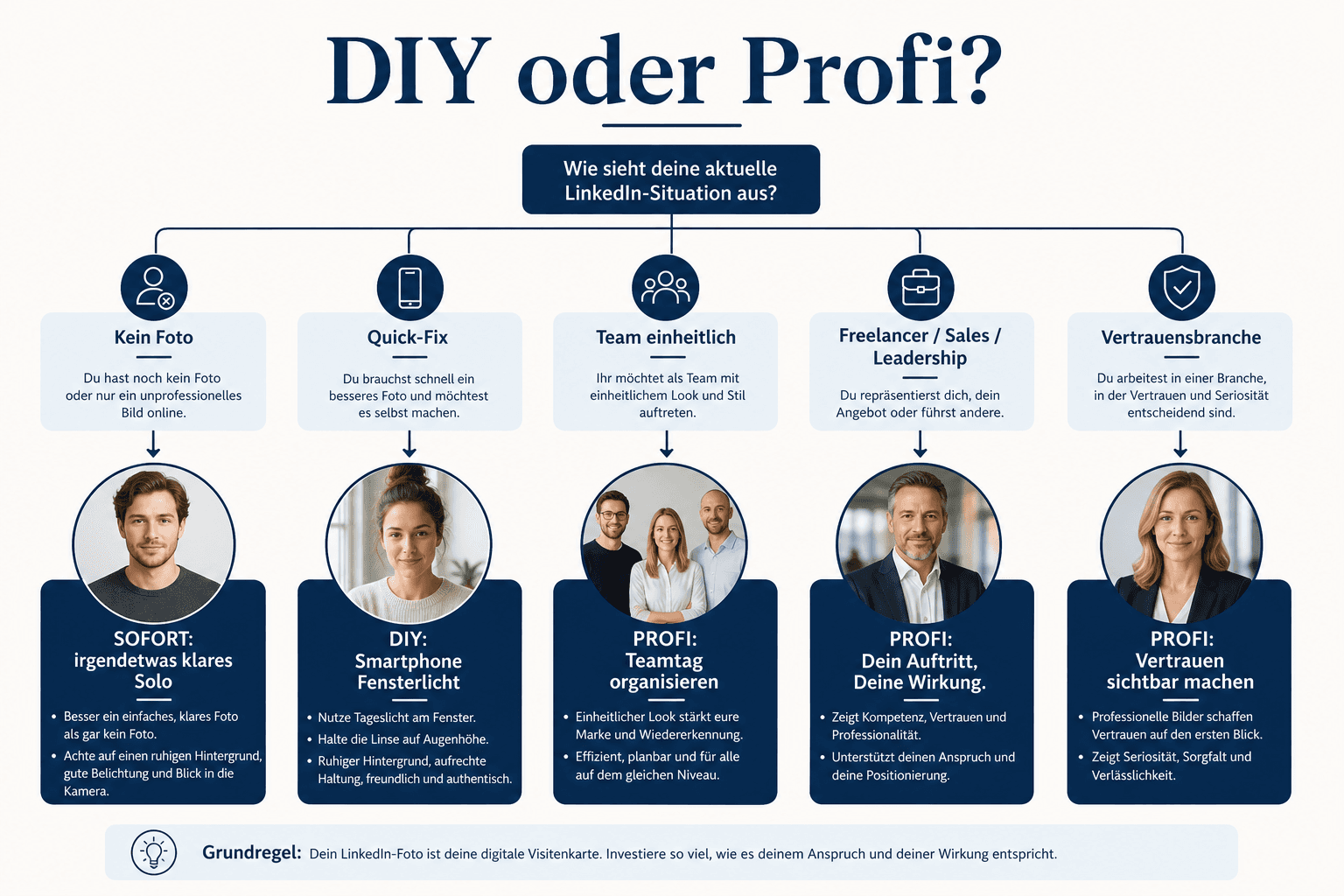
DIY vs. pro

You now know the LinkedIn criteria. The next question is pragmatic: is your setup enough — or does DIY cost more time and uncertainty than a short headshot? You don't need a studio for every update. You need an image that works in the circle and carries trust.

Decision tree: LinkedIn profile photo — DIY, validation or pro headshot
From purpose and industry through DIY check to the decision pro / team day
DIY often enough when …
good light, calm background, current outfit, circle crop checked — and you "only" need a solid solo image. Workflow: How to Create a Profile Picture.
Pro pays off when …
sales/leadership, trust industry, website + LinkedIn + press kit from one shoot, or you want several crops and expressions without self-doubt.
Team day when …
HR needs consistent LinkedIn headshots for the workforce — see section 09 and Prepare Employee Photos.

Price ranges and package logic: What Does Business Photography Cost. The often-cited 21× figure only applies to with photo vs. without photo — it justifies neither studio prices nor "only pro works". It justifies: have a clear, current face. You choose the quality tier by role and risk.

09
HR & team

HR: consistent LinkedIn headshots

When everyone on the team has different light, a different background and a different crop, the company looks random on LinkedIn. Consistency doesn't mean uniform — it means the same visual language: similar distance, similar brightness, similar color family, same quality standard. The process (timeline, slots, consent) stays in the prep guide — here only the LinkedIn briefing.

What belongs in the LinkedIn briefing

  • Purpose: LinkedIn + optional website/team page (same master file, different crops)
  • Style direction: formal / smart casual; color family (e.g. navy–anthracite); background rule
  • Outfit link or short rules — deep-dive: Clothing for Business Photos
  • Circle-crop note: face ~60 %, edge buffer, no text in the image
  • Timeline, slots, consent — process: Prepare Employee Photos
  • Delivery: square master + LinkedIn export (800–1000 px) + optional banner template 1584×396

After the shoot

Give clear upload instructions: which file for LinkedIn, when to update, whether company page and personal profile use the same image. Plan catch-up for latecomers — otherwise in three months the old selfies sit next to the new team headshots again.

10
AI

AI headshots — likeness & trust

Beside DIY and pro, 2026 has a third option: AI headshots. Some look stunning — and still fail on two points: likeness (do you really recognize yourself?) and trust, once it's clear the image is synthetic.

For LinkedIn: if you meet someone who knows you from the profile, the face has to match. Strong AI smoothing, wrong proportions or "too perfect" skin often create the uncanny-valley effect. Public discussions and surveys — including in the Ringover context — suggest: when an AI headshot is disclosed as such, trust often drops noticeably. That's orientation, not my own study; I deliberately name no invented percentages.

  • Check likeness: would colleagues recognize you immediately?
  • Meeting reality: does the image match your real appearance?
  • Industry risk: in law, medicine, finance authenticity is often more expensive than a cheap AI package
  • Transparency: if you use AI, be aware of the trust risk — especially in sales and leadership
  • Alternative: a real photo + light retouching often beats a "perfect" fake — working recommendation from headshot practice
11
Checklist

Checklist & next steps

Everything above condensed: check off before you save. Five minutes of checking save weeks with the wrong first impression.

Solo — LinkedIn upload

  • ☐ Current photo (recognizable as you look today)
  • ☐ Square export ~800–1000 px, JPG, under 8 MB
  • ☐ Face ~60 %, ~10 % edge buffer — circle preview checked
  • ☐ Eyes visible, look to camera, smile fitting the role
  • ☐ Background calm, no chaos, no text in the image
  • ☐ Outfit camera-ready (matte, calm) — see Clothing guide
  • ☐ Banner 1584×396: dead zone bottom-left clear
  • ☐ Optional: alternatives validated anonymously (PicVibe)

HR — team on LinkedIn

  • ☐ Style direction and purpose (LinkedIn / website) clarified
  • ☐ Briefing email with outfit, slot, crop note sent
  • ☐ Consent & usage sorted internally (prep guide)
  • ☐ Consistent setup booked or planned
  • ☐ Delivery package: master + LinkedIn square + banner template
  • ☐ Catch-up for absentees scheduled
  • ☐ Upload deadline and reminder set
12
FAQ

FAQ on the LinkedIn profile photo

What size should my LinkedIn profile photo be?
Officially LinkedIn accepts a range (~400–7680 px side length, ≤8 MB, JPG/PNG). In practice: square 800–1000 px, face clear in the circle. Larger rarely adds value in the feed.
Is the "21× more profile views" figure true?
It refers to profiles with a photo vs. without a photo (LinkedIn communication) — not studio vs. selfie. In parallel, older/differently rounded figures circulate (including around 14×). Both are orientation, not a guarantee. Quality (crop, expression, currency) is the second question.
How much of the face should be visible in the circle?
Rule of thumb: face about 60 % of image height, plus ~10 % edge buffer so hair and ears aren't cut off. Check the circle preview in upload.
What banner size do I need?
Classic desktop recommendation: 1584 × 396 px. Keep important content out of the dead zone bottom-left — the profile photo overlays there.
Should I smile on LinkedIn?
Usually yes — friendly and real. PhotoFeeler orientation (crowdsourcing, no invented percentages here): a teeth smile can raise likability; a very loud laugh can push competence down. Choose by industry and role; in doubt test two variants anonymously.
Is a smartphone photo enough?
Often yes, if light, background and circle crop are right. Workflow: How to Create a Profile Picture. For leadership, sales, trust industries or team series, pro pays off more often — experience from shoots, not an absolute claim.
How does this differ from "How to Create a Profile Picture"?
There: DIY multi-platform, window-light step sequence, general principles. Here: LinkedIn specs, circle, banner, DE industries, HR briefing, AI trust. Both articles complement each other — they don't replace each other.
How do we get consistent LinkedIn photos as a company?
One style direction, one setup, clear briefing email and catch-up. Prep: Prepare Employee Photos. Workflow: Employee Portraits & Corporate Photos. Inquiry: Business Photography.
Are AI headshots okay on LinkedIn?
Technically often possible — risky on the trust side, especially if likeness is missing or AI is disclosed. Discussions in the Ringover context I use only as orientation; without invented percentages. For public roles I recommend real photos.
Do you offer LinkedIn and business headshots in Hannover?
Yes. I'm a business photographer in Hannover and co-developed PicVibe. Details and inquiry: Business Photography. Openly: I earn from bookings; the guide above stays the practice on crop, banner and expression — whether you book or not.
**Transparency:** I offer [business photography in Hannover](/en/business-photography/) (headshots, LinkedIn, team series) and co-developed the [PicVibe](/en/best-free-photo-app/) app, where profile photos are rated anonymously. I mention both openly — not hidden. You need neither a booking nor the app to have a usable LinkedIn image after this guide. No brand sponsored this article; no fake affiliate products. The often-cited **21×** figure refers to profiles **with a photo vs. without** (LinkedIn communication), not studio vs. selfie. PhotoFeeler (expression) and Ringover context (AI trust) I use only as **orientation** — without invented percentages. As of: July 2026.
Next step

LinkedIn photo sorted — and shot professionally?

I'm a business photographer in Hannover: headshots that work in the circle, series for website and LinkedIn, clear crops and expressions. Tell me role, industry and whether solo or team — I'll brief you on banner and outfit too. Openly: I earn from the booking and co-developed PicVibe; the LinkedIn guide above stays the same practice standard — even without booking or app.

Keep reading

From the journal.

Fotograf, Martin Fernando Mera Kleinheinz · Franz-Bork-Straße 21, 30163 Hannover · 0179 4085297